
 Cart
Cart
Home > XML IDE - XML Editor > Screenshots > Stylus Studio Java IDE Screenshot


Stylus Studio® Java IDE Screenshot
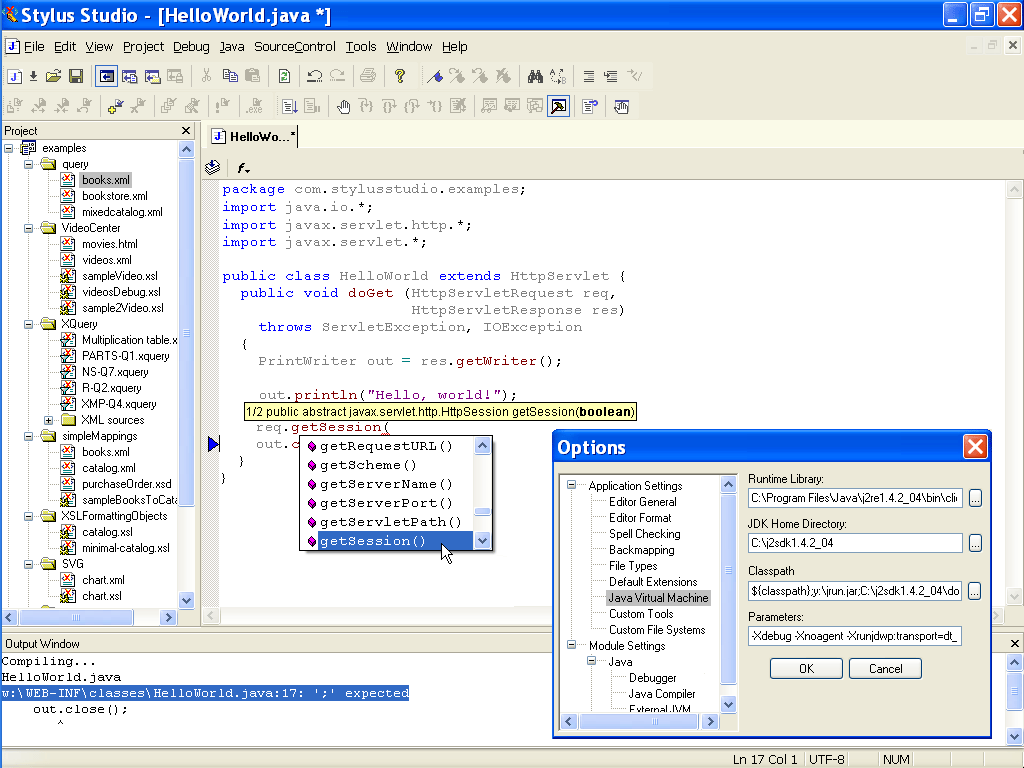
Stylus Studio®'s includes an integrated Java IDE that lets you edit, compile and work with any Java file directly within Stylus Studio®. Our Java editor provides enhanced java editing features such as:
- Syntax coloring for reserved words (e.g: import, package, return, etc)
- Color coding that can differentiate between objects and methods
- Java method sensing, including auto completion, and displaying the method signature for any Java function
- Single click compile button (or type CTRL-F7)
- Real time Java syntax checking, inserting a red underline for any code that is deemed to be incorrect (eg: missing semi-colon, missing brace, etc.)
- Integrated JavaDoc Help (just put your cursor on a java method and press F1)
- An integrated Output window that displays java compiler errors or warning messages
- Support for backmapping, which means that if you click on the error message in the Output Window, Stylus Studio® will highlight the line of code that generated the error
- Integration with the XQuery and XSLT tools to generate and compile code to execute your XML applications.
A screenshot of the Stylus Studio® Java IDE is illustrated here:
Related Java IDE features: