FLWOR Blocks

This section describes how to work with FLWOR blocks in the XQuery Mapper tab. It covers the following topics:

Parts of a FLWOR Block

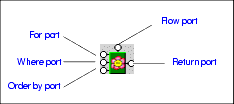
FLWOR blocks are drawn as a green block with an illustration of a flower at its center, and five connectors, called ports, placed along the block's border:

Figure 248. FLWOR Block

For, Order by, and Return ports

You define a FLWOR statement's For and Order by clauses by mapping source document elements and attributes to them, as appropriate. For example, if you wanted your XQuery to return a list of books ordered by publication date, you would map the book repeating element in books.xml to the FLWOR block's For port, and the Return port to the Book repeating element in catalog.xml. (As an alternative, you could map the two repeating elements directly, and Stylus Studio would create the FLWOR block and this mapping for you automatically, as described in Creating a FLWOR Block). Next, you would map the source document pubdate attribute to the Order by port. For a FLWOR block defined in this way, Stylus Studio generates the following XQuery:


              <Catalog>
               

              	{
               

              		for $book in /books/book
               

              		order by $book/@pubdate
               

              		return
               

              		<Book/>
               

              	}
               

              </Catalog>


Where port

The input for the Where port must be the output port of another block, such as a condition, IF, or function block. Imagine you have two source documents - you can create an Equal condition block, and specify that the content of an element in one source document must match the content of an element in the other source document, and map the return value of this condition to the Where port on the FLWOR block. Creating an Equal condition that specifies that the bookid attribute must be equal to the title element results in Stylus Studio generating the following XQuery code, for example:


              <Catalog>
               

              	{
               

              		for $book in /books/book
               

              		where $book/@bookid = $book/title
               

              		order by $book/@pubdate
               

              		return
               

              		<Book/>
               

              	}
               

              </Catalog>


See IF Blocks and Function Blocks for information on using other types of blocks in XQuery mapper.

Flow port

The Flow port, which is also present on IF and function blocks, allows you to link the result from other FLWOR, IF, and function blocks to define a conditional execution order for your XQuery expressions. You might decide you want a particular For each statement executed only after performing a certain function, for example. Inputs for the Flow port include the Return port of IF, function, and other FLWOR blocks.

Creating a FLWOR Block

You can create FLWOR blocks in the XQuery Mapper tab in one of two ways:

  • Right-click on the mapper canvas and select New | FLWOR Block from the shortcut menu.
  • Map one repeating element to another - Stylus Studio automatically creates a FLWOR block, mapping the source document node to the For port, and the Return port to the target structure node. Consider this code, which Stylus Studio generated after mapping the book repeating element in books.xml to the Book repeating element in catalog.xml:
    
                          <Catalog>
                           
    
                          	{
                           
    
                          		for $book in /books/book
                           
    
                          		return
                           
    
                          		<Book/>
                           
    
                          	}
                           
    
                          </Catalog>


Database-to-XML Mapping

Stylus Studio features several database-to-XML mapping tools that allow you to easily query a relational database using SQL/XML or SQL and render the results as XML. Stylus Studio also supports the world's first and only visual SQL/XML Editor!

XSD Mapping

Stylus Studio® includes a visual XSD-to-XSD mapping tool that allows you to easily implement sophisticated XML data mappings involving multiple data sources and customized data processing using either XSLT or XQuery code.

Learn XQuery in 10 Minutes, by Dr. Michael Kay - An XQuery Tutorial

Learn XQuery in 10 Minutes By Dr. Michael Kay is for all those people who really want to know what XQuery is, but don't have the time to find out. It's the fastest XQuery tutorial on the planet - read it now!

Xalan - Transforming XML with the Apache Xalan XSLT Processor

Apache Xalan is fully supported in Stylus Studio including integrated debugging, executing XSL stylesheets, troubleshooting, previewing XML transformations and more. Build Xalan applications faster and easier then before - Free Download.

Stylus Most Wanted

Site Map | Privacy Policy | Terms of Use | Trademarks
Free Stylus Studio XML Training:
W3C Member
Stylus Studio® and DataDirect XQuery™are products from DataDirect Technologies, is a registered trademark of Progress Software Corporation, in the U.S. and other countries. © 2004-2007 All Rights Reserved.