IF Blocks

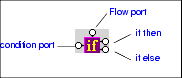
IF blocks have a single input port, labeled condition; a Flow port; and two result ports: if then, and if else.

Figure 254. IF Block

You use IF blocks to compose if then, else XQuery expressions, such as the following:


              		<Book>
               

              			{
               

              				if( $book/title ) then
               

              					<Title/>
               

              				else
               

              					<ISBN/>
               

              			}
               

              		</Book>


This expression, for example, was composed by mapping

  • The title element in the source document to the IF block's input port.
  • The if then result port to the Title element in the target structure.
  • The if else result port to the ISBN element in the target structure.

IF blocks create a structure if the if then or if else branches are true. These ports can be connected to the target schema; otherwise they can be connected to Flow ports of FLWOR, function, and other IF blocks.

DTD Generator

Stylus Studio's DTD Generator supports the automatic generation and association of both internal and external DTDs based on XML instance documents.

EDIFACT Standards Available Across All Versions

The complete EDIFACT Standards Grid, listing all EDIFACT versions across the top, and the corresponding messages down the left side.

XSLT Editor

Stylus Studio's XSLT Editor is the most advanced XSLT development tool on the market. This powerful tool provides backmapping, XSLT transformation preview, debugging, peformance profiling, and more!

FLWOR - An Introduction to the XQuery FLWOR Expression

An XQuery FLWOR Tutorial, covering an introduction to the main constructs of the XQuery FLWOR expression, including: For, Let, Where, Order By, and Return. Written by the W3C's Dr. Michael Kay.

Stylus Most Wanted

 
Free Stylus Studio XML Training:
W3C Member