Debugging XQuery Documents

Complex XQuery documents require robust debugging features.

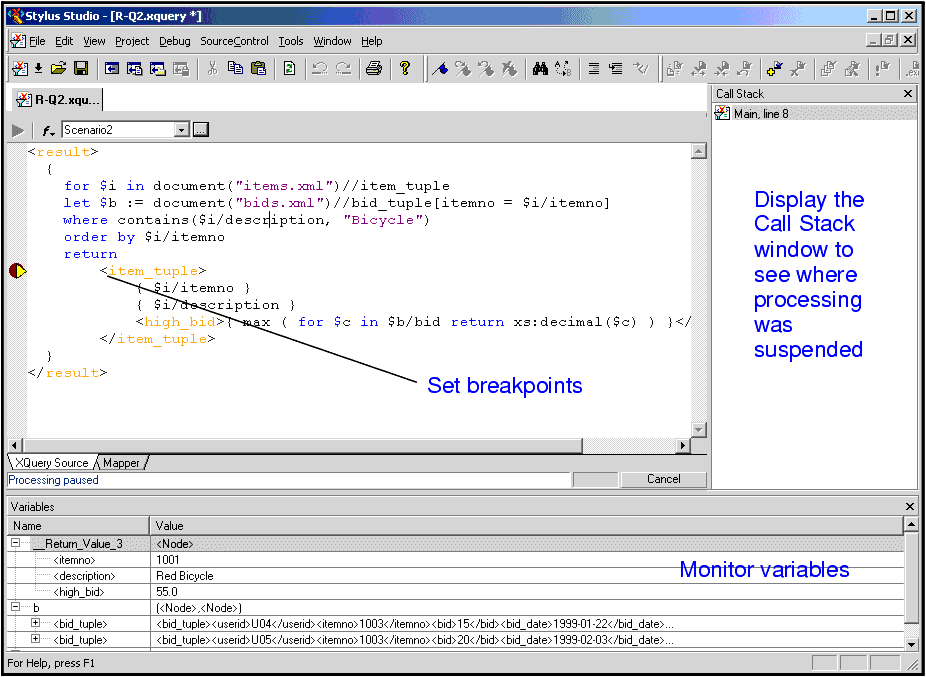
Figure 256. Debugging XQuery in Stylus Studio

With Stylus Studio, you can

  • Set breakpoints in your XQuery documents
  • Monitor the value of XQuery variables.
  • Trace the sequence of XQuery expressions that created output. With a click anywhere in the result, Stylus Studio Visual Backmapping technology displays the XQuery expression responsible for creating that result.
In this section

This section covers the following topics:

Convert HTML to XML

Convert HTML-to-XML with a Document Wizard that quickly converts any HTML to standard XML with the click of a button! To get started, just click File, Document Wizards on the Stylus Studio menu.

XML Notepad

XML Notepad simplifies building of XML applications, allowing authors to rapidly build and edit their XML files. With XML Notepad, you can create XML document prototypes quickly, easily, using an intuitive graphical interface.

EAI - Enterprise Application Integration

Using EAI tools included with Stylus Studio it's easy to unlock silos of enterprise data and seamlessly integrate it into your IT applications.

Hotels, Casinos & Resorts That Use Stylus Studio

What's more romantic than a vacation for two and the world's best XML IDE at your finger tips? Nothing, that's why these hotels, casinos, & resorts are using Stylus Studio to help you get on your dream vacation.

Stylus Most Wanted

Site Map | Privacy Policy | Terms of Use | Trademarks
Free Stylus Studio XML Training:
W3C Member
Stylus Studio® and DataDirect XQuery™are products from DataDirect Technologies, is a registered trademark of Progress Software Corporation, in the U.S. and other countries. © 2004-2007 All Rights Reserved.