Cart
Cart|
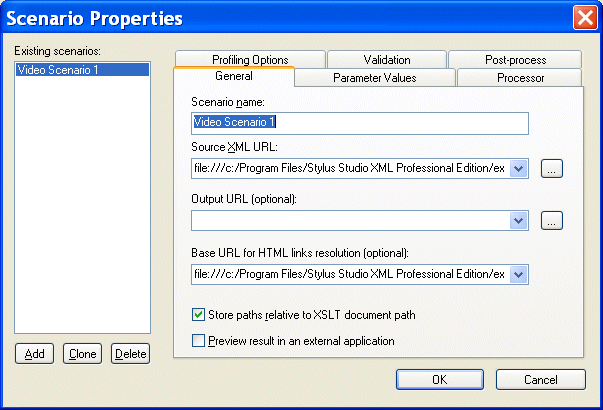
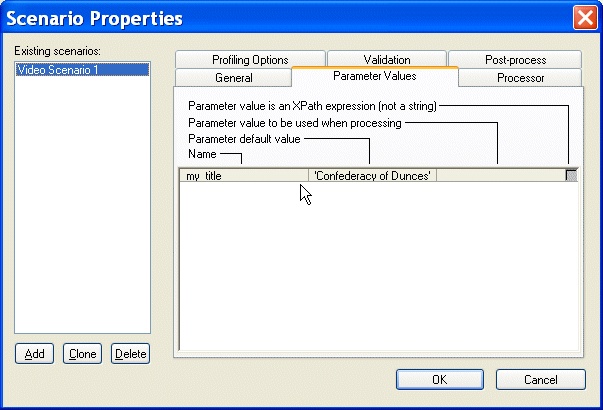
Home >Online Product Documentation >Table of Contents >Overview of Scenario Features Overview of Scenario FeaturesThis section describes the main features of XSLT scenarios. It covers the following topics: XML Source DocumentsThe main benefit of the XSLT scenario feature is that it lets you specify the XML document against which you want to run your XSLT. By default, Stylus Studio uses the first source document you add using the XSLT mapper as the XML source document for the scenario. You can specify the XML source document setting on the General tab of the Scenario Properties dialog box. See Source Documents to learn more about the process of selecting and working with source documents in XSLT mapper. Global ParametersThe Parameter Values tab of the Scenario Properties dialog box displays any global parameters you have defined in the XSLT source and allows you to For example, imagine the following parameter defined in the XSLT source: This parameter is displayed on the Parameter Values tab as follows: If you want to specify an alternate parameter value for this scenario, click the Parameter value to be used when processing entry field. If the alternate value you enter is an XPath expression, click the associated check box. By default, values entered in the Paramter value to be used when processing field are interpreted as strings. However, you can indicate that you want the value to be interpreted as an XPath expression by selecting the check box in the Parameter value is an XPath expression (not a string) field. This allows you to enter expressions such as the following:
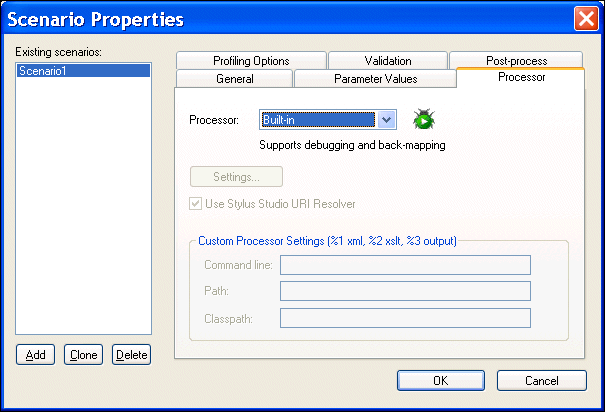
XSLT ProcessorsBy default, Stylus Studio uses a built-in processor to process XSLT documents. You can change the processor on the Processor tab of the Scenario Properties dialog box. You can choose from a number of third-party processors that are bundled with Stylus Studio, or you can specify your own custom processor.
See How to Use a Third-Party Processor for more information. Performance Metrics ReportingStylus Studio can generate an HTML report that contains information about how your XSLT is being processed. This option is off by default, but you can enable it, and choose options for the report, on the Profiling Options tab. See Profiling XSLT Stylesheets to learn more about the different ways in which Stylus Studio can provide you with XSLT performance metrics. Result Document ValidationYou can optionally validate the XML document that results from XSLT processing using the XML validator you specify. You can use
All validation is done before any post-processing that you might have specified. See Validating Result Documents. Post-Processing Result DocumentsYou can use the Post-process tab to specify any optional processing you want performed on the XML after it has been processed by the XSLT. You might want to use FOP to render XML as PDF, for example. |

XML PRODUCTIVITY THROUGH INNOVATION ™