|
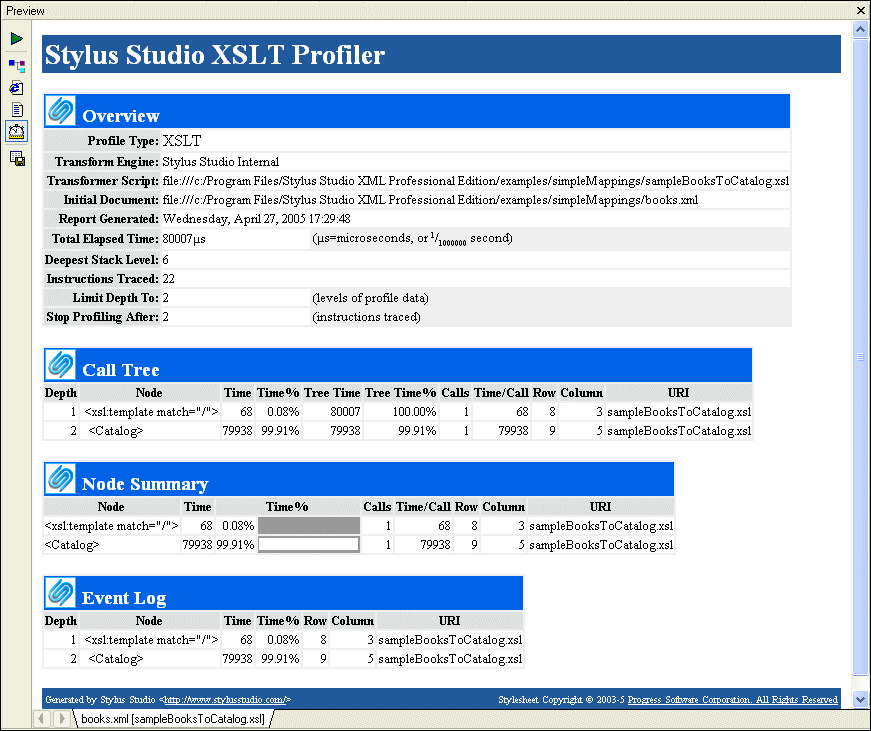
Home >Online Product Documentation >Table of Contents >Profiling XSLT Stylesheets Profiling XSLT StylesheetsIn addition to debugging tools for XSLT, Stylus Studio provides the XSLT Profiler, a tool that helps you evaluate the efficiency of your XSLT. By default, the performance metrics gathered by the XSLT Profiler are displayed in a preformatted report, like the one shown Figure 276:
The report format is controlled by the default XSLT stylesheet, profile.xsl, in the In addition to generating the standard XSLT Profiler report, you can save the raw data generated by the Profiler and use this data to create your own reports. See Enabling the Profiler for more information about this procedure.
A complete list of all the videos demonstrating Stylus Studio's features is here: http://www.stylusstudio.com/xml_videos.html. |

Introduction to Convert to XML
Convert to XML is Stylus Studio's all-purpose utility for getting legacy data integration of all sorts into a custom XML format. This video provides an overview of the tool and walks you through a sample CSV to XML data transformation project.
EDI to XML Mapping
A tutorial on how to transform EDI files into XML using Stylus Studio's Convert to XML tool. Subsequent post-processing of the converted EDI data is done through XQuery or XSLT, modeling a real world XML data integration application.
Supported XML Technologies
Learning XML is easy with Stylus Studio, the only XML IDE to support all official W3C XML technologies! Learn more about Stylus Studio's tools and support for XML and related W3C technologies.
Stylus Studio is a Real Cost-Saver in Novell Implementations
Learn how TriVir, a leading consulting group used Stylus Studio to implement a Novell based solutions using DirXML, eDirectory, and the exteNd suite for their government customers.