 Cart
Cart|
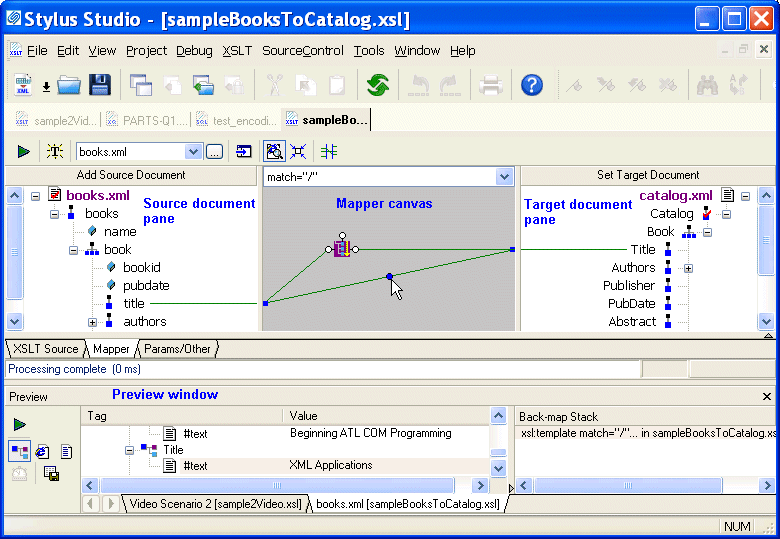
Home >Online Product Documentation >Table of Contents >Overview of the XSLT Mapper Overview of the XSLT MapperThe XSLT mapper helps you compose XSLT that aggregates data from one or more source documents, regardless of their origin or XML. For example, an inventory application might use information from multiple vendors, each of whom organizes invoices in a different way. You can use the XSLT mapper to identify source documents, map the relevant nodes from each to a target document, and in doing that define any required XSLT instructions, XPath or Java functions, and logical operators graphically. To use the XSLT mapper to create an XSLT stylesheet, you start by specifying one or more source documents and one target document. The Mapper tab consists of these areas:
As you link elements and define XSLT instruction and function blocks in the mapper, Stylus Studio composes XSLT for you, which is visible (and editable) any time you click the XSLT editor's XSLT Source tab. When you have finished mapping, you can apply the stylesheet to XML documents that have the same schema as the source document. The result document also has the same schema as the destination document.
As with the XSLT Source tab, you can preview XSLT results from the Mapper tab by clicking the Preview Result button ( This section covers the following topics: |

XML PRODUCTIVITY THROUGH INNOVATION ™
 ). Debugging, however, can be performed from the XSLT Source tab only.


