|
Home >Online Product Documentation >Table of Contents >Instruction Block Ports Instruction Block Ports
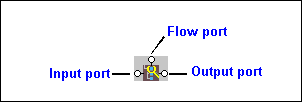
All XSLT instruction blocks have at least three connectors, called ports. Look at the
You use these ports to link source and target nodes, to perform processing on source document nodes, and to provide flow control as the result of a Ports are also part of XPath and Java function blocks, logical operator blocks, and text blocks. (See Processing Source Nodes for information on working with these types of blocks.) Specifying Values for PortsAfter you have added an instruction block to the XSLT mapper, you need to complete its definition. You do this by linking the instruction block's input, output, and, optionally, flow ports to nodes and other blocks in the mapper. The way you specify values for ports varies slightly between input ports and flow and output ports, but, generally speaking, you can either |

DTD vs. Schema
Stylus Studio provides tools for working with both W3C XML Schema and DTD's - this tutorial explains what the differences are between the two, providing a technical comparison of DTD vs Schema.
Scientific, Photo & Control Equipment
Scientific, photo & control equipment companies hear clicks and beeps all day. But, when it comes to data integration it needs to be done in a flash, that's why they use Stylus Studio. Come see which top companies are seeing XML in a brand new light!
Validating X12 Documents with XML Schemas
Either before or after transforming X12 EDI content, generated XML Schemas will make sure that we have all of the necessary components, our codes are all according to the standard codelists, and every little delimiter is in the right place.
Translating EDIFACT Documents to XML
The EDIFACT to XML Converter is a primary component of the adapter library. The XML that is generated is well commented and indented, and can be used anywhere XML is normally used — with XML Schemas, XQuery, XSLT, and so on.