Home >Online Product Documentation >Table of Contents >Understanding How the Default Templates Work
Understanding How the Default Templates Work
This topic is part of a sequence that starts with Creating a New Sample Stylesheet.
After you complete the steps in the previous section, you can see the bookstore.xsl stylesheet in the XSLT editor pane. It has the following contents:
The stylesheet explicitly contains one template, which matches the root node. When the XSLT processor applies a stylesheet, the first thing it does is search for a template that matches the root node. If there is no template that explicitly matches the root node, the XSLT processor uses a built-in template.
There are two built-in templates, also called default templates. Every XSLT stylesheet contains these templates whether or not they are explicitly specified. This is part of the W3C XSLT Recommendation.
This section discusses the following topics:
Instantiating the Template That Matches the Root Node
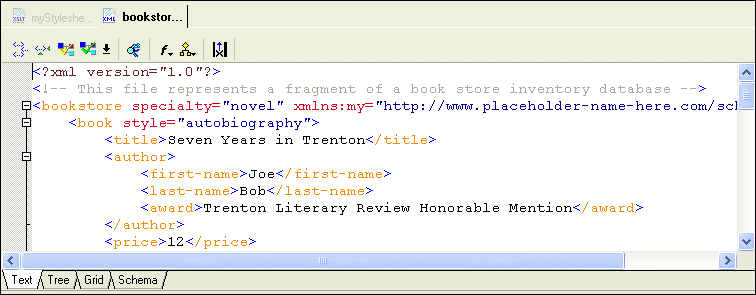
The XSLT processor instantiates the template that matches the root node. The template that matches the root node contains only the xsl:apply-templates instruction. In this template, the xsl:apply-templates instruction does not specify a select attribute. Consequently, the XSLT processor operates on the children of the node for which the root template was instantiated. In the bookstore.xml document, the root node has three children:
- XML declaration
- Comment
bookstore document element |
Figure 231. Source XML Document from DynamicBookstoreScenario
Unless you specify otherwise, the XSLT processor operates on the children in document order. The first child is a processing instruction (the XML declaration). The XSLT processor ignores processing instructions.
The second child is the comment node, and the XSLT processor also ignores comment nodes.
The third child is the bookstore document element. The XSLT processor searches for a template that matches bookstore. Because there is no template that explicitly matches the bookstore element, the XSLT processor instantiates a built-in template that is not explicitly in the stylesheet.
Instantiating the Root/Element Default Template
One default template matches *|/. This means it matches every element in the source document, and it also matches the root node. This is the root/element default template.
The root/element default template contains only the xsl:apply-templates instruction. Like the template that matches the root node, the xsl:apply-templates instruction in the root/element default template does not specify a select attribute. That is, it does not identify the set of nodes for which templates should be applied. Consequently, the XSLT processor operates on the children of the node for which the root/element template was instantiated.
In this case, the root/element default template was instantiated for the bookstore element. The children of the bookstore element include four book elements, a magazine element, and a book element associated with the my namespace.
The XSLT processor operates on these children in document order. First, it searches for a template that matches book. Because there is no template that explicitly matches the book element, the XSLT processor instantiates the root/element default template for the first book element.
Again, by default, the xsl:apply-templates instruction in the root/element default template operates on the children of the current node in document order. That is, it operates on the children of the first book element.
In the first book element, the first child is the title element. The XSLT processor searches for a template that matches the title element. Because there is no template that explicitly matches the title element, the XSLT processor instantiates the root/element default template again.
At this point, the XSLT processor has initiated instantiation of the root template once, and the root/element default template several times:
It is important to understand that these instantiations are not yet complete. Each subsequent instantiation of the root/element default template is inside the previous instantiations.
Instantiating the Text/Attribute Default Template
When the XSLT processor instantiates the root/element default template for the title element, the xsl:apply-templates instruction operates on the children of the title element. The title element has one child, which is a text node. The XSLT processor searches for a template that matches this text node. The second default template in the stylesheet matches this text node. This template matches text()|@*, meaning that it matches every text node and every attribute in the source document. This is the text/attribute template.
The XSLT processor instantiates the text/attribute default template for the title element's text node. This template contains only the xsl:value-of instruction. Its select attribute identifies the current node, which is the node for which the template was instantiated. This template copies the text contained in the current text node to the result document.
Now the result document contains the following text:
The XSLT processor is finished with the title element, and it next processes the author element in the first book element. There is no template that explicitly matches author, so the XSLT processor instantiates the root/element default template. The first child of the author element is the first-name element, and again, there is no template that explicitly matches the first-name element. The XSLT processor instantiates the root/element default template for the first-name element. The only child of the first-name element is a text node. The XSLT processor instantiates the text/attribute default template for this text node, and this template copies the text to the result document. Now the result document contains the following text:
The XSLT processor is finished with the first-name element, and it next processes the last-name element, which is the second child of the author element.
Illustration of Template Instantiations
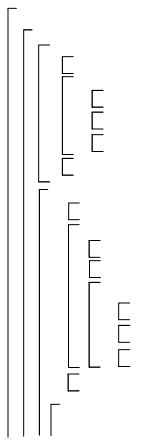
As you can see from the description in the previous section, the XSLT processor iterates through the process of searching for a matching template, instantiating one of the default templates, and operating on the children of the node for which the template was instantiated. The following figure shows the template instantiations through the second book element. In the figure, each bracket encloses the instantiations that together compose a complete instantiation for a particular element.
 Cart
Cart