Simplifying the Mapper Canvas Display

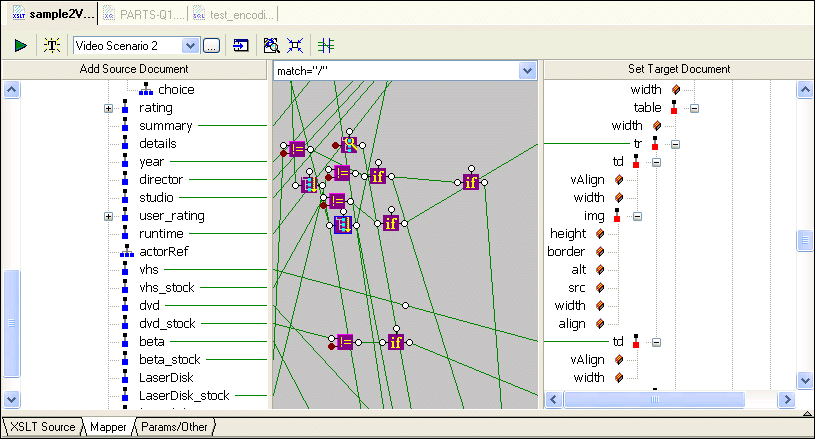
By default, the XSLT Mapper displays all links between source and target document nodes, regardless of whether or not the node associated with a link is currently visible in the Source Document or Target Document pane. Further, as your XSLT code becomes more complex, the mapper canvas can become dense with graphical representations of the functions defined in the code and the links that represent them. Consider this example of sample2Video.xsl, one of the sample XSLT stylesheets in the Examples project installed with Stylus Studio.

Figure 220. Mapper Shows Links to All Nodes, Visible or Not

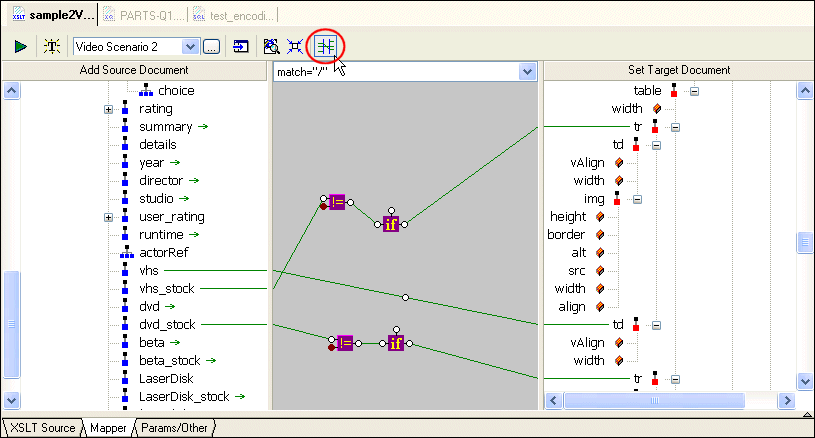
You can hide links for nodes that are not currently visible in the Source Document or Target Document pane by clicking the Hide Links for Nodes that are not Visible button, as shown in Figure 221:

Figure 221. Simply the Mapper by Hiding Links

When you use this feature, Stylus Studio displays

  • Links in the Mapper canvas only if both nodes are currently visible in the document panes
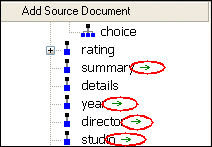
  • Green arrows (like the ones shown in Figure 222) in the document panes if only one of two linked nodes is currently visible.

Figure 222. Arrows Identify Partially Available Links

Other Mapper Display Features

In addition to displaying links for only those nodes that are visible in both document panes, you can use the document node shortcut menu (right-click on a node in a document pane) to

  • Show links to a specific node
  • Hide links to a specific node
  • Show/hide all links

DTD Validator

This page talks about Stylus Studio's DTD Validator it has the ability to specify any third-party XML parsers and validators, real-time syntax checking and DTD validation error reporting, backmapping, integrating third-party DTD validators and more!

Stylus Studio is a Real Cost-Saver in Novell Implementations

Learn how TriVir, a leading consulting group used Stylus Studio to implement a Novell based solutions using DirXML, eDirectory, and the exteNd suite for their government customers.

XQuery Tools Support for TigerLogic XDMS

Stylus Studio's integration with the TigerLogic XDMS XQuery processor, allowing you to execute advanced XQuery expressions directly against any TigerLogic XDMS instance.

XML-DEV Discussion Forum

XML-DEV is a leading technical forum for XML discussion and a valuable free XML learning resource. Subscribe to the XML-DEV email discussion forum today to help further your XML education.

Stylus Most Wanted

 
Free Stylus Studio XML Training:
W3C Member