Home >
Online Product Documentation >
Table of Contents >
Examining the wscall Function Block
Examining the wscall Function Block
The previous procedure,
Creating a ddtek:wscall Function, provided an example Web service (Swanad Mokashi's StockQuote WSDL (
http://www.swanandmokashi.com/HomePage/WebServices/StockQuotes.asmx?WSDL), and an example of an operation (
GetStockQuotes). This Web service, given a stock ticker value, returns information about that stock, including the company name, a current stock quote, daily high and low values, and related information.
Imagine we chose the
GetStockQuotes operation for our wscall. Let's take a closer look at the
wscall function block created by Stylus Studio.
As seen in
Figure 346, our
wscall function block was created with two input ports (we could have created a
wscall function block with three input ports), a flow port, and an output port. (See
Parts of a Function Block for general information about function blocks in XQuery Mapper.)
Location Input Port
The
location input port for the
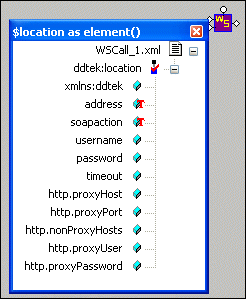
wscall function describes information about the Web service whose operation we selected for the XQuery, including its location (as a URL) and operation (as a SOAP action). This port is on all
wscall function blocks.
If you double-click the port, Stylus Studio displays a configurable information box, as shown in
Figure 347. (The same is true for other input ports and the output port.)
|
|
Figure 347. wscall Location Input Port
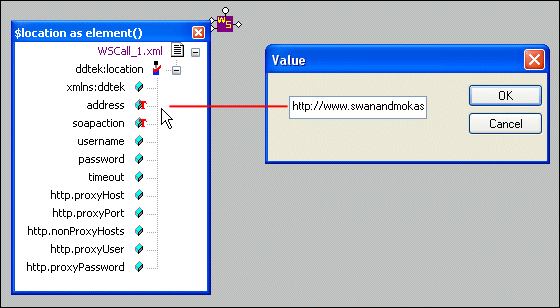
If we right-click the
address node and choose
Set Text Value, the Value dialog box displays the URL for the Swanand Mokashi Web service WSDL, as shown in
Figure 348:
|
|
Figure 348. Value for wscall location
Similarly, we would see
GetStockQuotes if we looked into the
soapaction node.
Payload Input Port
The
payload input port for the
wscall function describes the data the Web service requires in order to execute the SOAP action. This port is on all
wscall function blocks. (It is the second input port for functions added to XQuery Mapper using the
wscall/2 menu choice. It is the third input port if you used the
wscall/3 menu choice.)
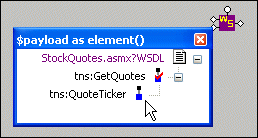
The "payload" for the Swanand Mokashi StockQuotes Web service, for example, is a ticker value - PRGS, GOOG, or EBAY, for example.
|
|
Figure 349. wscall Payload Input Port
By default, no text value is defined for the payload port.
Header Input Port
The
header port for the
wscall function appears on function blocks defined using the
wscall/3 menu choice. You use the header port to provide authentication and authorization information, like a username and password, for example.
Output Port
The
output port for the
wscall function displays the output of the Web service represented by the
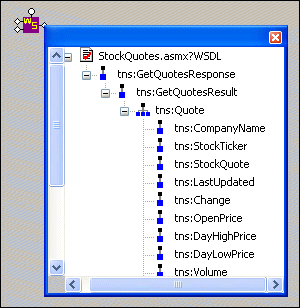
wscall function. In the case of the Swanand Mokashi StockQuote Web service, available output includes company name, stock quote, change, opening price, and so on, as shown in
Figure 348.
|
|
Figure 350. wscall Output Port
Displaying Port Information
To display port information, double-click the port.
Note that you can display information for only one input port at a time.
Moving Port Information
When you move a port information box, the
wscall function block moves with it, and vice versa.
 Cart
Cart