Cart
Cart
|
Home > Online Product Documentation > Table of Contents > Creating a ddtek:wscall Function Creating a ddtek:wscall FunctionTo create a ddtek:wscall function in XQuery Mapper:
1.
Open an XQuery document and click the
Mapper
tab.
2. Right-click the Mapper canvas and select
Function Block >
DataDirect XQuery >
wscall/2.
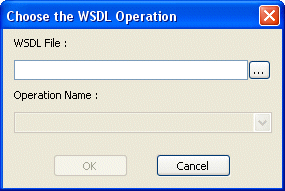
Stylus Studio displays the Choose the WSDL Operation dialog box.
3. Enter the URL of the WSDL whose operation you want your XQuery to execute in the
WSDL File field.
Example:
Stylus Studio displays the operations associated with the Web service represented by the WSDL in the Operation Name field.
4. Choose the Web service operation you want your XQuery to execute from the
Operation Name field.
Example:
5. Click OK.
Stylus Studio displays the
The illustration shown in
Figure 346 shows a
|

XML PRODUCTIVITY THROUGH INNOVATION ™