|
Home > Online Product Documentation > Table of Contents > Using the XPath Query Editor Using the XPath Query Editor
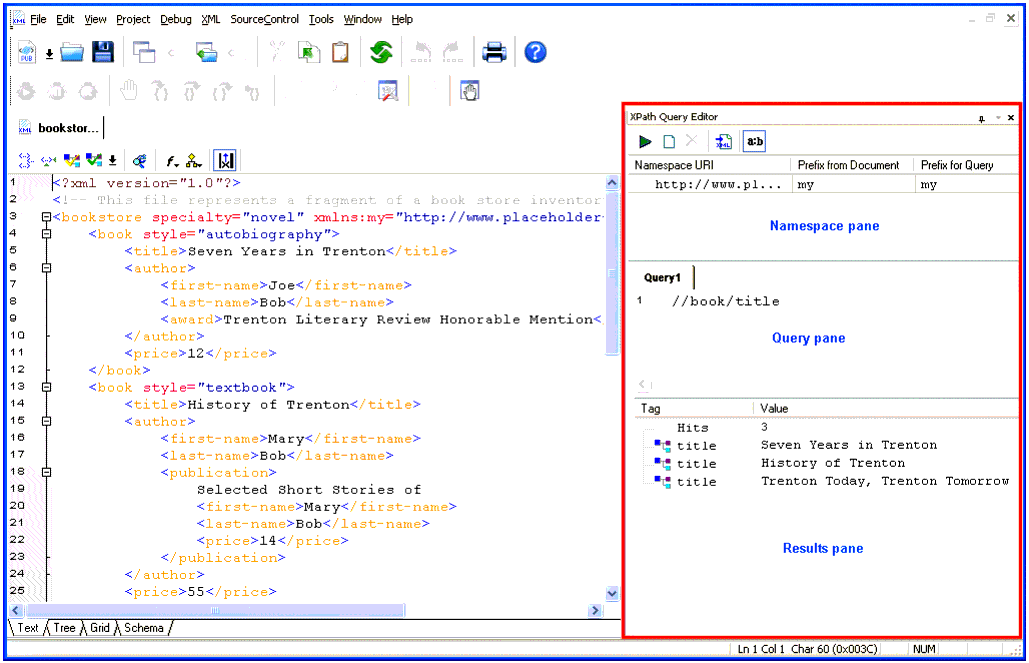
The XPath Query Editor is a dockable window that you can use to query XML documents in Stylus Studio. An example, showing an XPath expression being evaluated against bookstore.xml from the Example project installed with Stylus Studio, is shown here:
A complete list of the videos demonstrating Stylus Studio's features is here: http://www.stylusstudio.com/xml_videos.html. |

XML Processing
Learn how to simplify XML Processing using Stylus Studio XML Pipeline, the easiest way to visually design and deploy virtually any XML processing tasks.
Map between EDIFACT and X12
Anything can be mapped to anything: EDIFACT to X12 or vice-versa, either to XML, and any of those to flat files or other formats. Both the XSLT and XQuery mappers can help bridge complex formats with ease.
XQuery Debugger
The Stylus Studio XQuery Debugger allows you to set breakpoints and step through the evaluation of any XQuery expression in a way that gives you complete control and visibility into the XQuery expression evaluation process.
Web Service Data Mapping
Stylus Studio makes it possible for you to use Web services as live XML data sources for XML mapping projects.