Working with Query Results

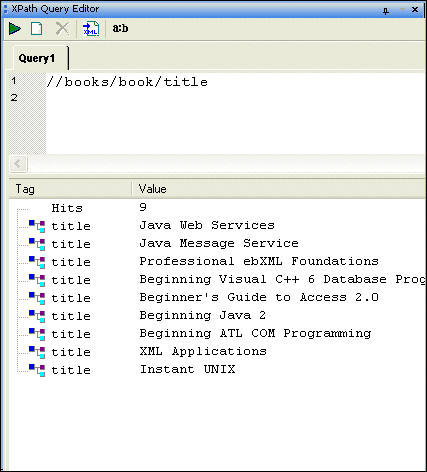
Query results are shown in the XPath Query Editor in the results pane as a number of hits and include the type of XML tag and value of each hit, as shown here.

Figure 285. XPath Result Pane

When you click on a result node, Stylus Studio's back-mapping feature highlights the line in the XML document that supplied the value for the result node you selected.

Opening Query Results as a New Document

After you have executed a query, you can optionally choose to display the query result in a new XML document. If the result contains only elements, Stylus Studio creates a root element (named < xqr:xpath-query-result>) to ensure that the document is well-formed.

To open a query result as an XML document:

Execute the query, and then

  • Click the Open result in a new XML document button on the XPath Query Editor tool bar ( ).

Alternative:

  • Right-click the query pane in the XPath Query Editor and select Open result in a new XML document from the shortcut menu.

XPath Query Editor

Stylus Studio's XML Editor has an XPath Query Editor that allows you to easily roubleshoot, test, and debug any XPath expression.

Stylus Studio Enables Multi-Channel Publishing for University of Pittsburg Professor

Learn how Dr. David Birnbaum of the University of Pittsburgh uses Stylus Studio to develop customized XSLT stylesheets that produce enhanced versions of source documents in different output formats, including Web and print.

EDI to XML Mapping in Stylus Studio

Learn how to use Stylus Studio's EDI to XML mapping tools in Convert-to-XML, including loading an EDI file, inspecting application control codes, customizing XML output and other advanced EDI to XML mapping features.

Stylus Studio API Documentation

Java API reference materials providing detailed information about Stylus Studio and other industry leading XML processing components.

Stylus Most Wanted

 
Free Stylus Studio XML Training:
W3C Member