Deleting Links in Sample Files

This topic is part of a sequence that starts with Opening the XSLT Mapper.

To delete links:
1. Click the Mapper tab if it is not already selected.
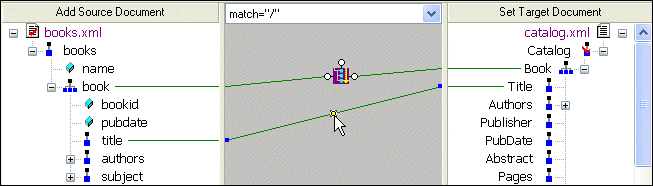
2. Click the title to Title link to select it.

Figure 36. Click a Link to Select It

3. Press the Delete key, or
a. Right-click the selected link. This displays a shortcut menu.
b. Click Delete to delete the selected link.

Tip


In addition to Delete, the shortcut menu displays the following options:

  • Go To Source displays the line of XSLT code represented by the link you select in the XML Editor.
  • Carry Value allows you to create <xsl:value-of select="."/> statements. This option is available for links representing xsl:for-each instructions only.

JSP Editor

Edit and Validate JSP 1.2 and JSP 2.0 documents. Includes JSP syntax coloring, JSP code completion and more.

XML-to-XML Mapper

XML to XML mapping tools in Stylus Studio provide a powerful visual interface for mapping XML data from-and-to virtually any data format using industry-standard XSLT and XQuery technologies.

Apache XML Project

The Apache XML Project provides standards-based, open-source XML solutions for working with W3C XML technologies including XML, XSL, XSLT, XSL:FO XPath, Web services and more. Learn how Stylus Studio provides support for all Apache XML projects.

DTD vs. Schema

Stylus Studio provides tools for working with both W3C XML Schema and DTD's - this tutorial explains what the differences are between the two, providing a technical comparison of DTD vs Schema.

Stylus Most Wanted

Site Map | Privacy Policy | Terms of Use | Trademarks
Free Stylus Studio XML Training:
W3C Member
Stylus Studio® and DataDirect XQuery™are products from DataDirect Technologies, is a registered trademark of Progress Software Corporation, in the U.S. and other countries. © 2004-2007 All Rights Reserved.