Cart
Cart
|
Home > Online Product Documentation > Table of Contents > Opening the XSLT Mapper Opening the XSLT MapperThis procedure describes how to open the XSLT Mapper and select the files you want to use for the drag-and-drop operations that will define your XSLT stylesheet. To open the XSLT Mapper:
1. From the Stylus Studio menu bar, select
File >
New >
XSLT Stylesheet.
Stylus Studio displays the Scenario Properties dialog box.
2. Click the
Cancel button to dismiss the dialog box.
3. Click the
Mapper tab.
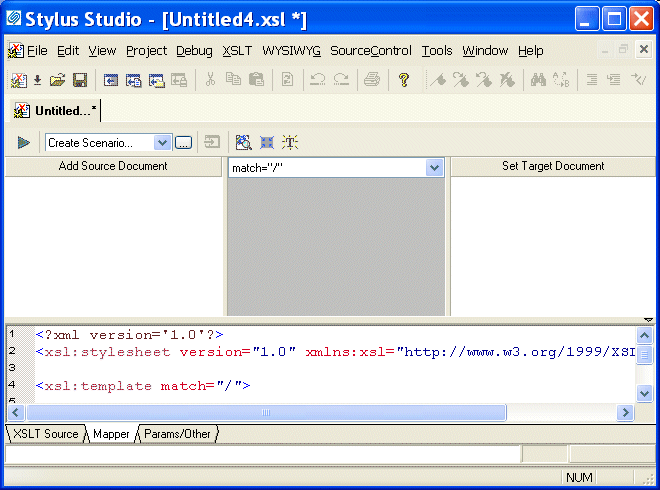
Stylus Studio displays XSLT editor with the Mapper tab selected. The source pane beneath the mapper panes appears by default, allowing you to see how the mappings of XML document elements are rendered as XSLT. The source pane is fully editable and synchronized with the XSLT Mapper. Of course, you can always click the XSLT Source tab for a full-screen view of your XSLT code.
4. Click the
Add Source Document button at the top of the mapper's left pane.
Stylus Studio displays the Open dialog box.
5. For this example, navigate to the
examples\simpleMappings directory in the Stylus Studio installation directory.
6. Double-click
books.xml.
7. Click the
Set Target Document button at the top of the Mapper's right pane.
Stylus Studio displays the Open dialog box.
8. For this example, navigate to the
examples\simpleMappings directory in the Stylus Studio installation directory.
9. Double-click
catalog.xml.
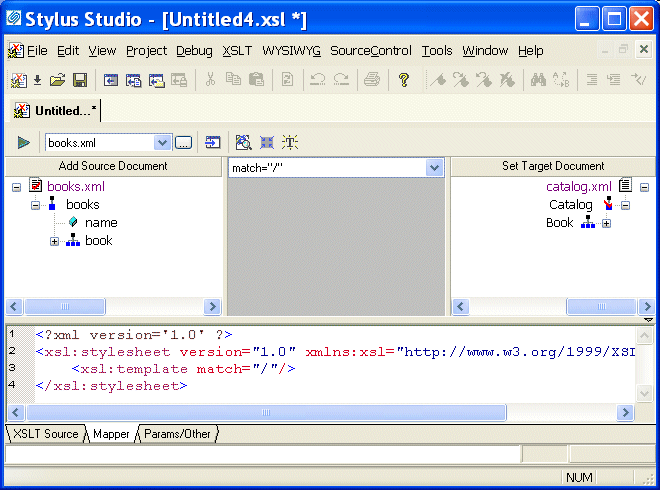
Stylus Studio displays tree diagrams of these XML documents. The default XSLT source code has not been altered at this point.
|

XML PRODUCTIVITY THROUGH INNOVATION ™