How to Generate Code

To generate code for an XML Publisher report:
1. Preview the XML Publisher report. If it is satisfactory, continue with this procedure.
2. Click the Generate button.

Alternative: Select Report > Generate from the menu.

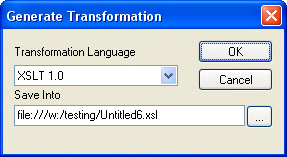
Stylus Studio displays the Generate Transformation dialog box.

Figure 492. Generate Transformation Dialog Box

3. Use the Transformation Language field to specify whether you want to use XSLT 1.0, XSLT 2.0, or XQuery 1.0.
4. The default URI for the generated XSLT or XQuery code is displayed in the Save Into field. Unless you specify otherwise, Stylus Studio uses the .report file name for the .xsl or .xquery file name.
5. Click OK.

Learn Convert to XML

Convert to XML lets you convert .txt, binary, and EDI files to XML documents. Convert to XML works on a single document, or to build reusable converters that let you open flat files as XML documents. Free online demonstration!

Web Service Data Mapping

Stylus Studio makes it possible for you to use Web services as live XML data sources for XML mapping projects.

Improving XSLT and XQuery Performance with Stylus Studio

This online video demonstration covers XQuery and XSLT performance tuning using the Stylus Studio XSLT profiler and the XQuery profiler.

Supported XML Technologies

Learning XML is easy with Stylus Studio, the only XML IDE to support all official W3C XML technologies! Learn more about Stylus Studio's tools and support for XML and related W3C technologies.

Stylus Most Wanted

 
Free Stylus Studio XML Training:
W3C Member