How Data Sources are Represented in XML Publisher

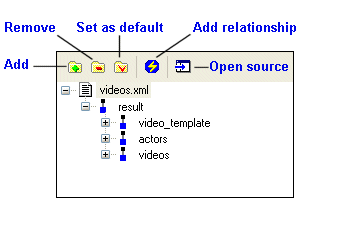
When you add a data source to the data sources panel, Stylus Studio displays the schema representation, or the data model, for that source. The following illustration shows how the videos.xml document from the VideoCenter folder in the examples project appears after it has been added as a data source:

Figure 438. XML Document in the Data Sources Panel

Working with Namespaces

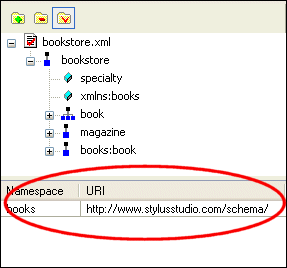
If the document you have selected as a source uses a namespace prefix, Stylus Studio displays the prefix and the URI at the bottom of the data sources panel, as shown in Figure 439.

Figure 439. Namespace Prefix and URI

You can edit the value in the Namespace field, which can simplify the process of typing XPath expressions you might use when defining a property. For example, you could change books to simply b to shorten and simplify XPath expressions. See Example: Using Context and XPath Sub-Properties to Format Text to learn more about using XPath expressions when building XML Publisher reports.

Television

Television

XQuery Integration

Learn how new XQuery technologies can simplify legacy data integration by leveraging industry standards, proven open-source XML processing components, and Stylus Studio's integrated XQuery & XML tools.

Apache AXIS

Develop and test Web service applications using Apache AXIS and Stylus Studio.

Stylus Studio API Documentation

Java API reference materials providing detailed information about Stylus Studio and other industry leading XML processing components.

Stylus Most Wanted

 
Free Stylus Studio XML Training:
W3C Member