Edge Style

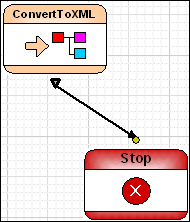
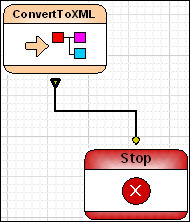
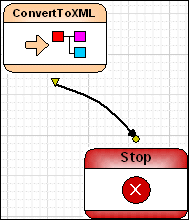
You can choose from one of three edge styles for the pipes that connect one node to another:

Term
Example
Line
Orthogonal
Spline
Table 116. Edge Styles

When you change the style, either from the XMLPipeline menu or the toolbar, you change the style

  • Of any pipes that are currently selected; this includes the pipes associated with any selected nodes
  • Of any pipe you create after selecting the new style
To change the edge style:
1. Select the pipe, or the node whose pipes, you want to change.
2. Select XML Pipeline > Edges Style from the menu.

Alternative: Right-click and select XML Pipeline > Edges Style from the shortcut menu.

3. Select the edge style you want from the drop-down menu.

XML Schema Validator, DTD Validator

Stylus Studio lets you validate XML documents using integrated XML Schema or DTD validators. Use the Stylus Studio built-in validator, or any number of supported XML parsers and XML validators like MSXML SAX and DOM, Xerces, .NET, and more!

Support for US National Library of Medicine (NLM) Document Type Definitions

Stylus Studio provides support for editing and validating XML documents using US National Library of Medicine data models. In this tutorial, we'll provide a step-by-step overview of how to use the NLM DTD's in Stylus Studio!

JavaServer Pages IDE (JSP IDE)

The Stylus Studio JSP IDE provides syntax help and code completion for developing JSP 1.2 and JSP 2.0 applications.

Convert DTD to XSD

learn how to convert DTD to XML Schema

Stylus Most Wanted

Site Map | Privacy Policy | Terms of Use | Trademarks
Free Stylus Studio XML Training:
W3C Member
Stylus Studio® and DataDirect XQuery™are products from DataDirect Technologies, is a registered trademark of Progress Software Corporation, in the U.S. and other countries. © 2004-2007 All Rights Reserved.