Example of an XML Pipeline in Stylus Studio

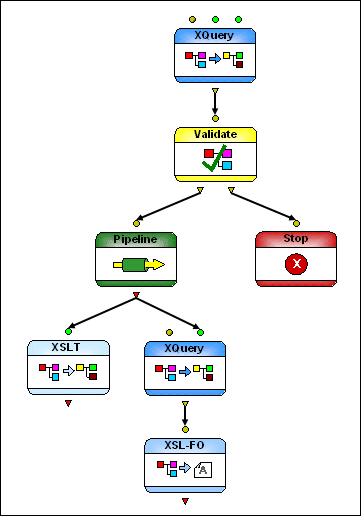
Figure 387 shows the diagram that represents getHoldings.pipeline, which is in the pipelines\stocks folder in the examples project installed with Stylus Studio.

Figure 387. Diagram of getHoldings.pipeline

This particular XML pipeline:

  • Aggregates two XML input sources
  • Validates the output of the XQuery using XML Schema and then either
    • Terminates if the validation fails or
    • Passes the output to an embedded pipeline for additional processing
  • Using XSLT, transforms the embedded pipeline's output to HTML
  • Using XQuery, transforms the same output to PDF using XSL-FO processing

Medical Companies That Use Stylus Studio

Medical companies can't solve every ache and pain. That's why when it comes to the struggle of data integration, they turn to Stylus Studio to simplify their pains. Come see which medical companies are injecting Stylus Studio into their work load!

Technology Companies That Use Stylus Studio

Technology companies can't always handle every technology that they come across. That's why when it comes to XML, they look to Stylus Studio to guide them. Check out which top technology companies are looking to the future with Stylus Studio.

DTD vs. Schema

Stylus Studio provides tools for working with both W3C XML Schema and DTD's - this tutorial explains what the differences are between the two, providing a technical comparison of DTD vs Schema.

Validating EDIFACT Documents with XML Schemas

Either before or after transforming EDIFACT content, generated XML Schemas will make sure that we have all of the necessary components, our codes are all according to the standard codelists, and every little delimiter is in the right place.

Stylus Most Wanted

 
Free Stylus Studio XML Training:
W3C Member