|
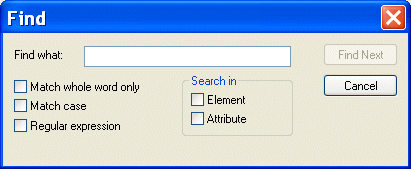
Home > Online Product Documentation > Table of Contents > Searching Document Panes Searching Document PanesYou can search document panes using the Find dialog box.
You can restrict your search to elements and/or attributes, and you can even search using regular expressions to define your match pattern. To display the Find dialog box:
1. Right-click in the document pane.
2. Select
Find from the shortcut menu.
|

Stylus Studio User Guides (PDF Download)
Download Stylus Studio User Guides in printer-friendly PDF format, including documentation of past (older) versions of Stylus Studio.
Text File to XML
Stylus Studio provides several easy-to-use document wizards that allow you to quickly convert text files to XML. Create XML from text and EDI, create XML Schema from EDIFACT, and more!
Food & Beverage Services
"I'll have a burger and a side of Stylus Studio", says these top food & beverage services that use Stylus Studio in everyday operations. Come see which food & beverage services eat up the idea of having the most powerful XML IDE at their finger tips!
Convert DTD to XSD
learn how to convert DTD to XML Schema