Simplifying the Mapper Canvas Display

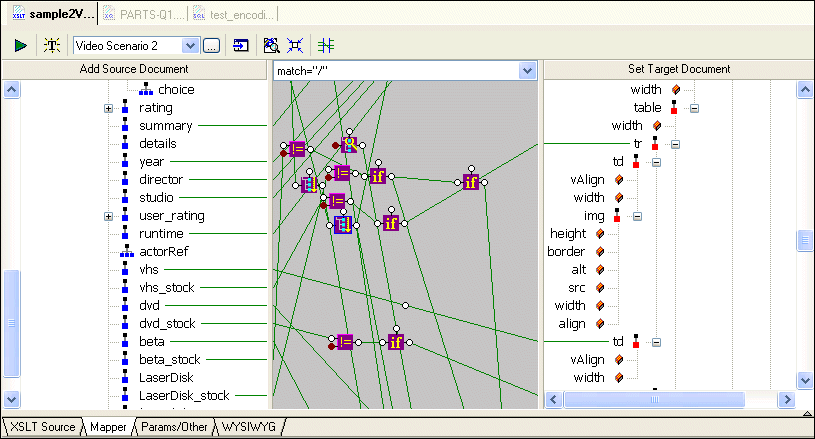
By default, the XSLT Mapper displays all links between source and target document nodes, regardless of whether or not the node associated with a link is currently visible in the Source Document or Target Document pane. Further, as your XSLT code becomes more complex, the mapper canvas can become dense with graphical representations of the functions defined in the code and the links that represent them. Consider this example of sample2Video.xsl, one of the sample XSLT stylesheets in the Examples project installed with Stylus Studio.

Figure 232. Mapper Shows Links to All Nodes, Visible or Not

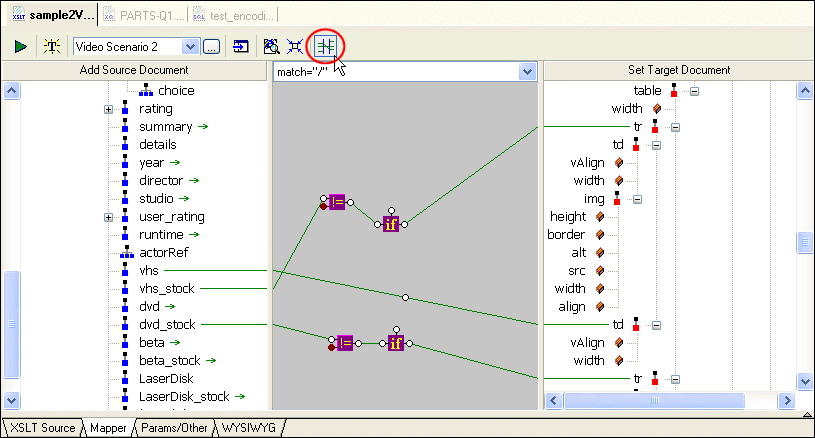
You can hide links for nodes that are not currently visible in the Source Document or Target Document pane by clicking the Hide Links for Nodes that are not Visible button, as shown in Figure 233:

Figure 233. Simply the Mapper by Hiding Links

When you use this feature, Stylus Studio displays

  • Links in the Mapper canvas only if both nodes are currently visible in the document panes
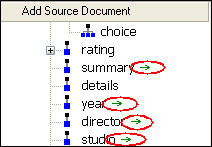
  • Green arrows (like the ones shown in Figure 234) in the document panes if only one of two linked nodes is currently visible.

Figure 234. Arrows Identify Partially Available Links

Other Mapper Display Features

In addition to displaying links for only those nodes that are visible in both document panes, you can use the document node shortcut menu (right-click on a node in a document pane) to

  • Show links to a specific node
  • Hide links to a specific node
  • Show/hide all links

Web Service Data-to-XML Mapper

Stylus Studio provides a powerful standards-based solution for accessing and transforming live Web service XML data. Intuitive tools like the Web Service Call Composer and UDDI Browser make developing Web service applications a snap.

Supported XML Technologies

Learning XML is easy with Stylus Studio, the only XML IDE to support all official W3C XML technologies! Learn more about Stylus Studio's tools and support for XML and related W3C technologies.

XSLT Debugger

Stylus Studio's XSLT debugger - a requirement for building bug-free XSLT stylesheets and XML data transformation applications. Stylus Studio's XSLT debugger gives you complete visibility and control over the XSLT transformation process.

Support for DataDirect SequeLink

Learn about Stylus Studio's support for DataDirect SequeLink, an end-to-end database middleware solution that provides a universal thin client for ODBC, JDBC, ADO or .NET, providing flexibility for both client- and server-based deployments.

Stylus Most Wanted

 
Free Stylus Studio XML Training:
W3C Member