XML Pipeline Terminology

Understanding the following terms will help you work with XML pipelines in Stylus Studio.

Term
Description
Example
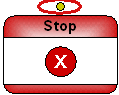
Node
Generally, an XML pipeline operation. In an XML pipeline diagram, the glyph that represents an XML pipeline operation. Examples include XSLT, XQuery, Pipeline, and Validate.
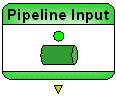
Input port
The circle on top of some nodes used to receive a pipe from an output port. A node can have more than one input port.
Output port
The triangle on the bottom of some nodes used to connect to an input port using a pipe. A node can have more than one output port.
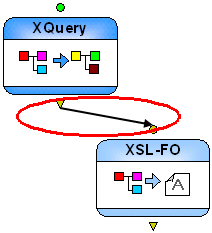
Pipe
The conceptual name for the line that connects two nodes, from the output port on one, to the input port on the other.
Table 79. XML Pipeline Terminology

Using DTD in Microsoft Applications

Learn how to integrate DTD's into your Microsoft applications using MSXML or System.XML DTD processing components.

DOM - The Document Object Model

The Document Object Model (DOM) is a cross-platform interface for parsing and manipulating XML. Learn how Stylus Studio supports DOM in our XML Pipeline and other XML parsing tools.

Text File to XML

Stylus Studio provides several easy-to-use document wizards that allow you to quickly convert text files to XML. Create XML from text and EDI, create XML Schema from EDIFACT, and more!

Building DataDirect XML Converter Applications with Stylus Studio

DataDirect XML Converters are Java and .NET components that enable access to any data (flat files, EDI) from your application code. Learn how to deploy XML applications today.

Stylus Most Wanted

 
Free Stylus Studio XML Training:
W3C Member