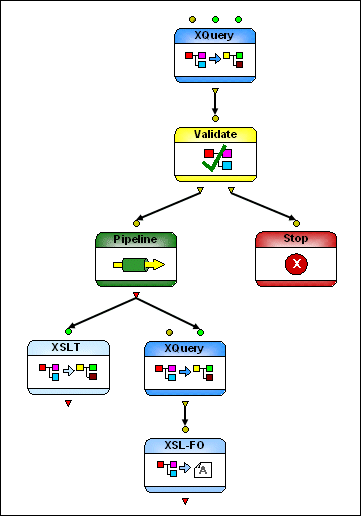
Example of an XML Pipeline in Stylus Studio

Figure 391 shows the diagram that represents getHoldings.pipeline, which is in the pipelines\stocks folder in the examples project installed with Stylus Studio.

Figure 391. Diagram of getHoldings.pipeline

This particular XML pipeline:

  • Aggregates two XML input sources
  • Validates the output of the XQuery using XML Schema and then either
    • Terminates if the validation fails or
    • Passes the output to an embedded pipeline for additional processing
  • Using XSLT, transforms the embedded pipeline's output to HTML
  • Using XQuery, transforms the same output to PDF using XSL-FO processing

Generating Java Code with Stylus Studio

This is a video tutorial on how to generate Java Code with Stylus Studio

Computing XML Differences in Stylus Studio

See for yourself just how easy it is to visually compare different XML files or folders using Stylus Studio's powerful new XML Differencing Utility. Quickly and easily analyze and merge changes made to different XML documents!

Retail Companies That Use Stylus Studio

Stores and XML data can get very crowded. That's why retail companies use Stylus Studio to simplify their data. With the power of Stylus Studio these top retail companies are at the front of the line when it comes to XML!

Metals, Mining & Crude-Oil Production

It can be very dark and dreary in a mine. That's why metal, mining & crude-oil production are using Stylus Studio as their light when it comes to data integration. See which of these top companies are using Stylus Studio to show them the way to XML!

Stylus Most Wanted

 
Free Stylus Studio XML Training:
W3C Member