|
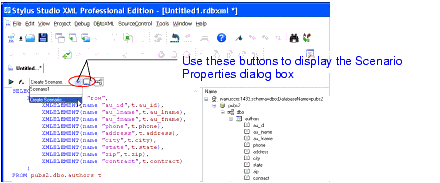
Home > Online Product Documentation > Table of Contents > Opening the Scenario Properties Dialog Box Opening the Scenario Properties Dialog BoxThere are two ways to open the Scenario Properties dialog box for DB-to-XML data sources. Both allow you to work on existing DB-to-XML data source scenarios or to create new ones. To open the Scenario Properties dialog box:
|

Airlines, Aerospace and Defense
Want to know what airlines, aerospace and defense companies are soaring high with Stylus Studio 2006? Well now you can! Come check out these leading companies and soar with Stylus Studio 2006 yourself.
Multi Channel Publishing
Multi channel publishing lets you go beyond single-source publishing of HTML and PDF to also generate simultaneously for non-document forms, such as to communicate with partners or drive spreadsheets.
Convert DTD to XML
Learn how to create a sample XML instance document from a DTD using Stylus Studio DTD to XML conversion tools.
XML Schema-Aware Queries and Stylesheets
Learn how to simplify XSLT and XQuery applications using Schema Aware XSLT and XQuery processing technologies.