Working with Relational Data as XML

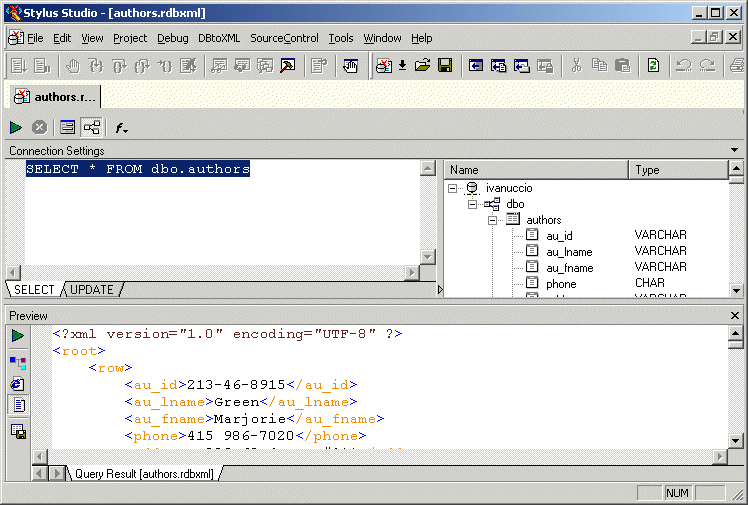
As shown in the example in the preceding section, an SQL/XML query is returned as XML. The XML is displayed in the Preview window in the DB-to-XML data source editor, as shown in Figure 376.

Figure 376. SQL/XML Query Returned as XML

You can work with an SQL/XML query result as XML and, optionally, update the relational database using changes to the XML file and the SQL/XML statements defined on the UPDATE tab of the DB-to-XML data source editor.

Validate XML Using XSD

You can validate XML documents against any data model defined using W3C XSD, using any major XSD Validator, including MSXML 3.0, MSXML 4.0, MSXML 6.0, Xerces-J, Xerces-C, Microsoft System.XML (1.0 and 2.0), XSV, the Saxonica XSD Validator and others.

Oracle XML Tools

Oracle XML tools for working with relational and XML data, including exporting of database tables to XML and importing XML into the Oracle8i, Oracle9i and Oracle10g databases.

Translating XML documents to EDIFACT

In-place, via XSLT and via XQuery are all mechanisms supported for converting XML to EDIFACT

Using DataDirect XQuery with Stylus Studio

Learn how to query any relational database using XQuery and the XQuery API for Java using DataDirect XQuery, an embeddable Java component, and Stylus Studio the world's leading XML IDE.

Stylus Most Wanted

 
Free Stylus Studio XML Training:
W3C Member