|
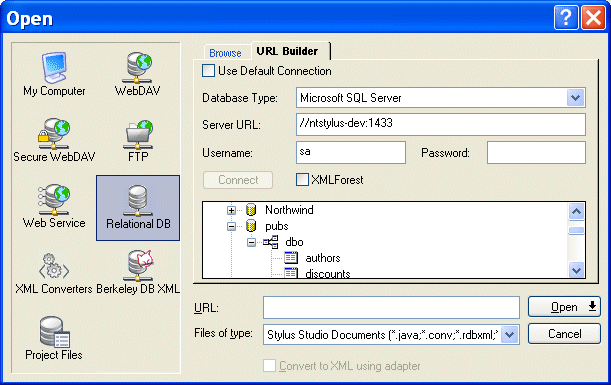
Home > Online Product Documentation > Table of Contents > Using the URL Builder Using the URL BuilderThe URL Builder utility lets you connect to a relational database server, select a table or view, and render that object as an XML document. You can use this feature, implemented on the URL Builder tab of the Open dialog box, to open relational data as an XML document anywhere in Stylus Studio - in the XML Editor, the XQuery and XSLT Mappers, and so on.
A complete list of the videos demonstrating Stylus Studio's features is here: http://www.stylusstudio.com/xml_videos.html. In this sectionThis section covers the following topics: |

Validating EDIFACT Documents with XML Schemas
Either before or after transforming EDIFACT content, generated XML Schemas will make sure that we have all of the necessary components, our codes are all according to the standard codelists, and every little delimiter is in the right place.
XPath Editor
Stylus Studio's intelligent code-sensing, auto-completion technology, Sense:X, is XPath-aware. You'll find Sense:X for XPath in all of Stylus Studio's editors, including the XML Editor, XSLT Editor, and XQuery Editor.
Building Workflow Applications with XML
Learn how to design custom XML workflow applications - from modeling your data and information processes, to capturing input from users in XML, and finally, generating useful queries and reports from the XML data -- using XSLT & XQuery technologies.
Using OASIS XML Catalogs in Stylus Studio
Learn about Stylus Studio's XML catalog support and how to work with XML catalogs in your Stylus Studio XML projects.