|
|
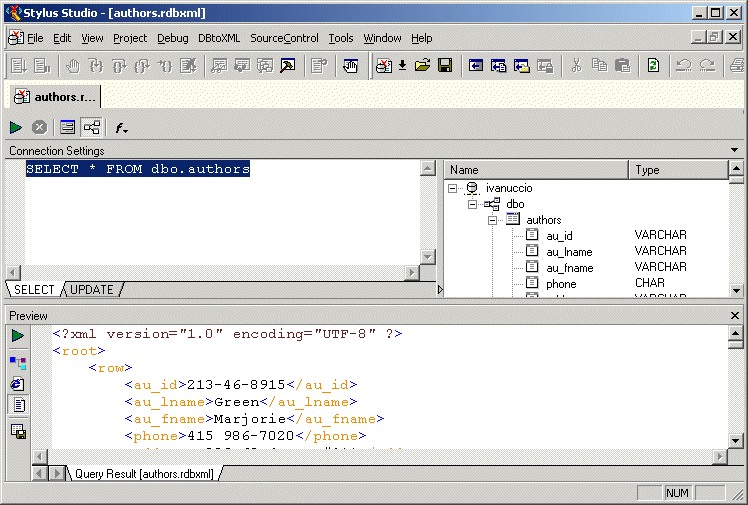
Home > Online Product Documentation > Table of Contents > Working with Relational Data as XML Working with Relational Data as XMLAs shown in the example in the preceding section, an SQL/XML query is returned as XML. The XML is displayed in the Preview window in the DB-to-XML data source editor, as shown in Figure 281.
You can work with an SQL/XML query result as XML and, optionally, update the relational database using changes to the XML file and the SQL/XML statements defined on the UPDATE tab of the DB-to-XML data source editor. |

XML Helps Uncork Innovative Winery Web Sites
Learn how Freerun Technologies, Inc., a leading Internet services provider used Stylus Studio and XML technologies to develop a framework for Web-based eCommerce applications for the wine industry, reducing development cycles.
Using DTD in Java Applications
Learn how to validate XML documents using industry-standard DTD's from within your Java applications using Java DTD components including Apache Xerces and XSV.
Web Service Standards
Stylus Studio supports Web service standards including WSDL, UDDI and SOAP. The Web Service Tester lets you easily develop and leverage Web services in your XML applications.
XML Schema Editor
Stylus Studio's XML Schema Editor lets you easily develop advanced data models expressed in W3C XML Schema. Its synchronized split-pane interface shows both a visual XML Schema Diagram and the underlying code, and you can edit in either one.