Cart
Cart|
|
Home > Online Product Documentation > Table of Contents > Example ExampleThis example shows how to define a DB-to-XML data source, and how DB-to-XML data sources interact with a relational database. Consider a DB-to-XML data source that performs a simple SELECT and INSERT. The SELECT StatementThe SELECT statement is defined on the SELECT tab of the DB-to-XML editor:
This SELECT statement returns every author record from the
The INSERT StatementThe INSERT statement is defined on the UPDATE tab of the DB-to-XML data source editor:
This INSERT statement attempts to insert the entire XML document content into table
Saving the FileAfter executing the query from the DB-to-XML data source editor, we examine the query results, which are rendered as XML in the Preview window. (See Figure 281 , for an example of how SQL/XML query results are displayed in Stylus Studio.) Checking the results allows us to verify that the table we are querying is providing us with the data we expect.
Once we have verified the query result, we save the
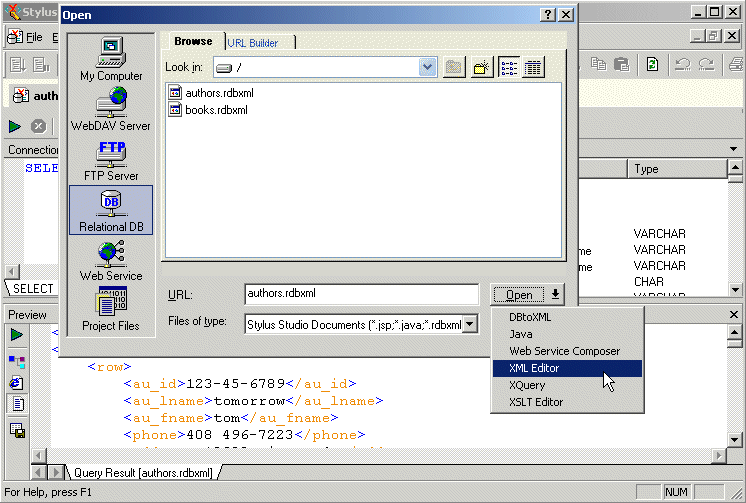
Opening the .rdbxml as XML
Next, we open the
When the DB-to-XML data source is opened in the XML editor, it looks just like any other XML document - it displays the XML returned when we executed the SQL/XML query. Other data source attributes (connection settings and the SQL/XML statements themselves) are not accessible or visible when a data source is opened as XML, but they are present as metadata. Updating the Data in the Database
To update the data from the
The document now contains a total of 26
Similarly, if we deleted all existing
|

XML PRODUCTIVITY THROUGH INNOVATION ™