|
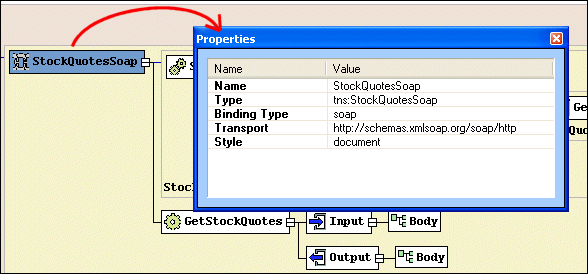
Home >Online Product Documentation >Table of Contents >Properties Window Properties WindowYou use the Properties window to set values for WSDL elements. Not all element values can be set using the diagram pane - the Binding element's transport type, for example. You can write the necessary XML by hand in the text pane if you choose, but it can be easier, faster, and less error-prone to set these values using the drop-down lists for Values fields in the Properties window. |

Updating Relational Data Using Stylus Studio
WSDL Editor
WSDL Editor featuring a graphical WSDL viewer, syntax help, Java Web Service code generation and more. Simplify Web Services development with Stylus Studio's Web Service Description Language (WSDL) Editor today!
Scientific, Photo & Control Equipment
Scientific, photo & control equipment companies hear clicks and beeps all day. But, when it comes to data integration it needs to be done in a flash, that's why they use Stylus Studio. Come see which top companies are seeing XML in a brand new light!
Support for US National Library of Medicine (NLM) Document Type Definitions
Stylus Studio provides support for editing and validating XML documents using US National Library of Medicine data models. In this tutorial, we'll provide a step-by-step overview of how to use the NLM DTD's in Stylus Studio!