Cart
Cart|
|
Home >Online Product Documentation >Table of Contents >Importing WSDL Documents Importing WSDL DocumentsBy importing one WSDL document into another, you can easily reuse elements that have been defined in other WSDLs, rather than redefining elements locally. You import WSDLs at the Definitions (root) element. To import a WSDL document:
1. Select the Definitions (root) element.
2. Select Diagram > Imported Files from the Stylus Studio menu.
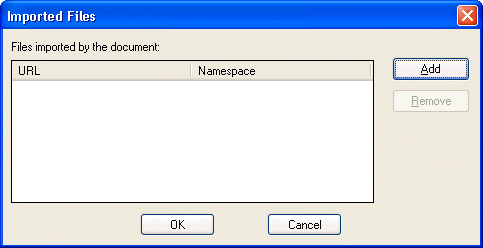
Alternative: Right-click the Definitions element and choose Imported Files from the shortcut menu. Stylus Studio displays the Imported Files dialog box.
If the WSDL you are editing already has imported WSDL documents (
3. Click the Add button.
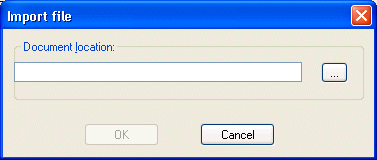
Stylus Studio displays the Import File dialog box.
4. Enter a URL for the WSDL document you want to import, or use the more button (  ) to display the Open dialog box, which allows you to navigate your file systems.
5. Click OK.
The Import Files dialog box closes, and you are returned to the Imported Files dialog box. The WSDL document you selected appears in the Files imported by the document list box.
6. Click the Add button to import another WSDL; otherwise, click OK.
The Imported Files dialog box closes. |

XML PRODUCTIVITY THROUGH INNOVATION ™