 Cart
Cart
|
Home >Online Product Documentation >Table of Contents >Inserting a Breakpoint in the Sample Stylesheet Inserting a Breakpoint in the Sample StylesheetThis topic is part of a sequence that starts with Setting Up Stylus Studio to Debug Sample Files. As with any debugger, in the Stylus Studio XSLT debugger you insert a breakpoint where you want to suspend processing and examine what is going on. You can do this using the Debug menu or the debug set of tools in the tool bar.
To insert a breakpoint in the sample stylesheet:
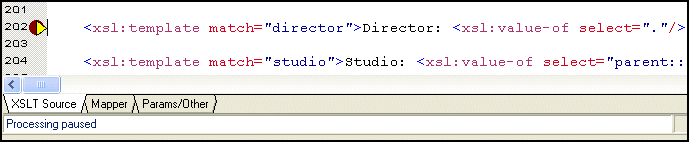
1. In the XSLT Editor, click in line 202. Line numbers appear in the lower right corner of the XSLT Editor window. Line 202 starts with
<xsl:template match="director">
2. In the Stylus Studio tool bar, click Toggle Breakpoint  .
.
Alternative: If you prefer, select Debug > Toggle Breakpoint, or press F9.
Stylus Studio displays a red circle to the left of the line that contains the Do not do it, but to remove a breakpoint, you click in the line that has the breakpoint and then click Toggle Breakpoint (or F9). The Toggle Breakpoint button and F9 key operate as toggles.
3. Press F5 to start debugging.
Alternative:In the Stylus Studio tool bar, click Start Debugging The XSLT processor displays a yellow triangle to indicate where processing has been suspended. Instead of the finished HTML created when you first ran the scenario, the Preview window displays just the HTML code because complete processing of the XSLT was suspended before the finished HTML could be rendered.
Do not do it, but to stop debugging, you can click Cancel in the lower right corner of the XSLT editor window, or click Stop Debugging
If you click Preview Result |

XML PRODUCTIVITY THROUGH INNOVATION ™


 .
.
 in the Stylus Studio tool bar.
 instead of pressing F5, Stylus Studio applies the stylesheet without running the debugger. Pressing F5 always invokes the debugger. If there are no breakpoints, and no errors, processing completes and Stylus Studio displays the result in the Preview window.


