|
Home >Online Product Documentation >Table of Contents >Setting Up Stylus Studio to Debug Sample Files Setting Up Stylus Studio to Debug Sample FilesTo set up Stylus Studio to debug sample files:
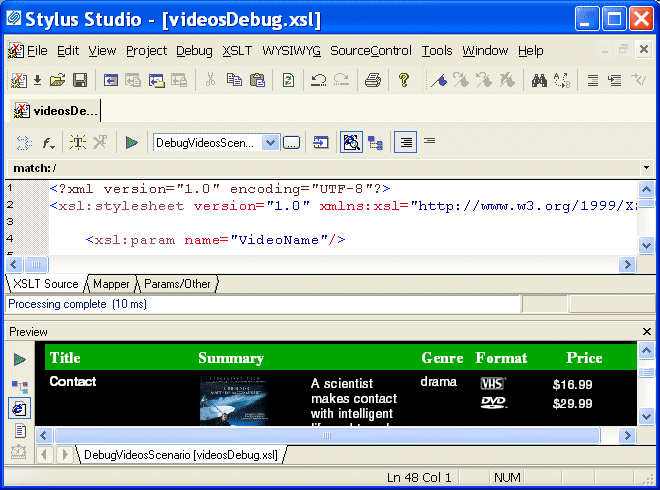
1. Open the videosDebug.xsl stylesheet, located in the examples\VideoCenter directory where Stylus Studio was installed.
Alternative: If the Stylus Studio Project window is open, you can access this stylesheet from the
Stylus Studio displays the
2. In the XSLT editor tool bar, click Preview Result DebugVideosScenario. The source XML document is videos.xml.
Stylus Studio applies the stylesheet and displays the results (a finished HTML page that displays information about a single video) in the Preview window. |

Getting EDI to XML and back to EDI Again: Round Trip Engineering using Stylus Studio URL Adapters
A free online video demonstration shows how to use Stylus Studio's Adapter URL technologies to convert EDI to XML and back again. Convert, validate, view and edit EDIFACT data directly in Stylus Studio.
Web Service Data-to-XML Mapper
Stylus Studio provides a powerful standards-based solution for accessing and transforming live Web service XML data. Intuitive tools like the Web Service Call Composer and UDDI Browser make developing Web service applications a snap.
Binary XML
How do I get my binary data into XML? How do I get my binary data out of XML? The answers to these questions and more in this amazing Binary XML tutorial.
Java IDE
Edit, compile and debug and generate Java code with Stylus Studio's Java Integrated Development Environment (IDE). Supports popular Java XML processing components including Apache Xalan, Apache Axis, Apache Xerces, Saxon and more.