|
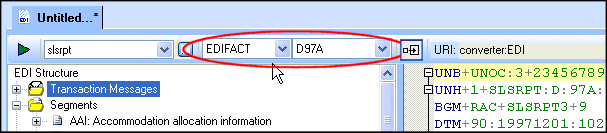
Home >Online Product Documentation >Table of Contents >EDI to XML Conversions and EDI Standards EDI to XML Conversions and EDI StandardsAn EDI to XML conversion can become associated with an EDI standard (dialect and version) in one of two ways: The EDI dialect and version associated with an EDI to XML conversion is always displayed in the EDI to XML editor. You can change the EDI dialect and/or version any time you are working with the EDI to XML editor using the Select Dialect and Select Version fields. |

Configuring an ODBC Data Source Using DataDirect SequeLink Server
How to create and configure an ODBC system data source for use with Stylus Studio using DataDirect Sequelink Server.
Building Web Services With Stylus Studio
This video demonstration shows you how to use Stylus Studio's Web Service call composer to locate a WSDL file on the Internet, inspect, create SOAP envelope, invoke and inspect Web service data.
Retail Companies That Use Stylus Studio
Stores and XML data can get very crowded. That's why retail companies use Stylus Studio to simplify their data. With the power of Stylus Studio these top retail companies are at the front of the line when it comes to XML!
XML Schema Validation
Validate XML using XML Schema with MSXML, XERCES, XSV, SYSTEM.XML, & other XSD Validators. Stylus Studio's XML Schema-Aware XML Editing makes XML Schema Validation a snap!