|
Home >Online Product Documentation >Table of Contents >Using the Grid Tab Using the Grid Tab
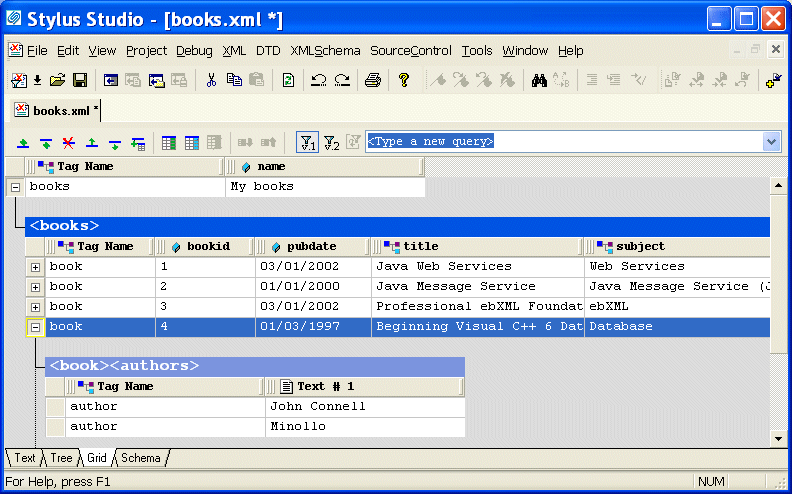
The Grid view of an XML document is useful for structured data - it is a convenient way to view and work with documents that contain multiple instances of the same type of element. This section describes the features of the Grid tab and how to use it to edit XML documents. This section covers the following topics:
A complete list of the videos demonstrating Stylus Studio's features is here: http://www.stylusstudio.com/xml_videos.html. |

JavaServer Pages IDE (JSP IDE)
The Stylus Studio JSP IDE provides syntax help and code completion for developing JSP 1.2 and JSP 2.0 applications.
XPath Introduction - Using XPath Queries to Extract Data from XML Documents
The XPath introduction covers how to use XPath code completion, XPath syntax highlighting, support for XPath 2.0 functions and XML namespaces to simplify your next XPath application.
Apache FOP
Apache FOP is an open-source engine is available from the Apache project that renders XSL-FO into PDF and other popular document formats. Apache FOP is fully integrated with Stylus Studio's XSL:FO tools.
Medical Companies That Use Stylus Studio
Medical companies can't solve every ache and pain. That's why when it comes to the struggle of data integration, they turn to Stylus Studio to simplify their pains. Come see which medical companies are injecting Stylus Studio into their work load!