Cart
Cart|
Home > Online Product Documentation > Table of Contents > Instruction Block Ports Instruction Block Ports
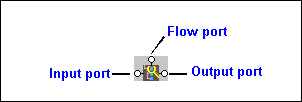
All XSLT instruction blocks have at least three connectors, called
ports. Look at the
You use these ports to link source and target nodes, to perform processing on source document nodes, and to provide flow control as the result of a
Ports are also part of XPath and Java function blocks, logical operator blocks, and text blocks. (See Processing Source Nodes for information on working with these types of blocks.) Specifying Values for PortsAfter you have added an instruction block to the XSLT mapper, you need to complete its definition. You do this by linking the instruction block's input, output, and, optionally, flow ports to nodes and other blocks in the mapper. The way you specify values for ports varies slightly between input ports and flow and output ports, but, generally speaking, you can either
|

XML PRODUCTIVITY THROUGH INNOVATION ™