|
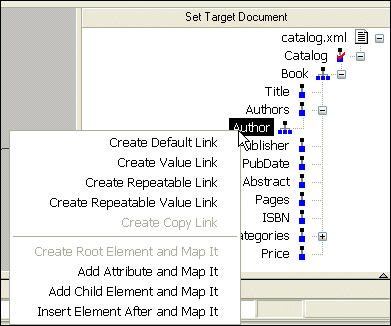
Home > Online Product Documentation > Table of Contents > Left and Right Mouse Buttons Explained Left and Right Mouse Buttons ExplainedYou can use either the left or the right mouse button to perform the drag and drop operation used to create source-target mappings in the XSLT mapper. If you use the left mouse button to perform the drag operation, the link always maps the source node to the target node without making any changes to the target structure. If you use the right mouse button, Stylus Studio displays a shortcut menu that provides you with alternatives for modifying the target structure.
Using this menu, you can
|

Oracle XML Tools
Oracle XML tools for working with relational and XML data, including exporting of database tables to XML and importing XML into the Oracle8i, Oracle9i and Oracle10g databases.
Building DataDirect XQuery Applications
Stylus Studio further simplifies relational and XML data integration by providing advanced XQuery tools support for building XQuery applications which use DataDirect XQuery.
Convert HTML to XML
Convert HTML-to-XML with a Document Wizard that quickly converts any HTML to standard XML with the click of a button! To get started, just click File, Document Wizards on the Stylus Studio menu.
Generate XSD
Stylus Studio® can generate an industry standard W3C XSD (or DTD) by correctly inferring an XML data model from an XML instance document.