|
Home > Online Product Documentation > Table of Contents > Creating a Stylesheet from HTML Creating a Stylesheet from HTMLYou can create an XSLT stylesheet from an HTML file using the HTML to XSLT document wizard.
To run the HTML to XSLT document wizard:
1. Select
File > Document Wizards from the menu.
The Document Wizards dialog box appears.
2. Click the
XSLT Editor tab.
3. Double-click
HTML to XSLT (or select the
HTML to XSLT icon and click
OK).
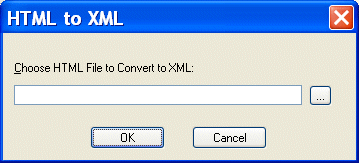
The HTML to XML dialog box appears.
4. Enter the name of the HTML file you want to convert to XSLT in the
Choose HTML File to Convert to XSLT field.
5. Click
OK.
Stylus Studio opens the converted HTML file as an untitled XSLT document in the XSLT Editor. |

XQuery Talk Blog
Get the latest XQuery news and information at XQuery-Talk - an online community for discussing XQuery technologies, examples, implementations and more. Bookmark this RSS or ATOM feed now!
DB2
IBM DB2 is a database management system for powering business applications. Learn how to build XML solutions on DB2 using Stylus Studio's DB2 tools.
Translating EDIFACT Documents to XML
The EDIFACT to XML Converter is a primary component of the adapter library. The XML that is generated is well commented and indented, and can be used anywhere XML is normally used — with XML Schemas, XQuery, XSLT, and so on.
Using DataDirect XQuery with Stylus Studio
Learn how to query any relational database using XQuery and the XQuery API for Java using DataDirect XQuery, an embeddable Java component, and Stylus Studio the world's leading XML IDE.