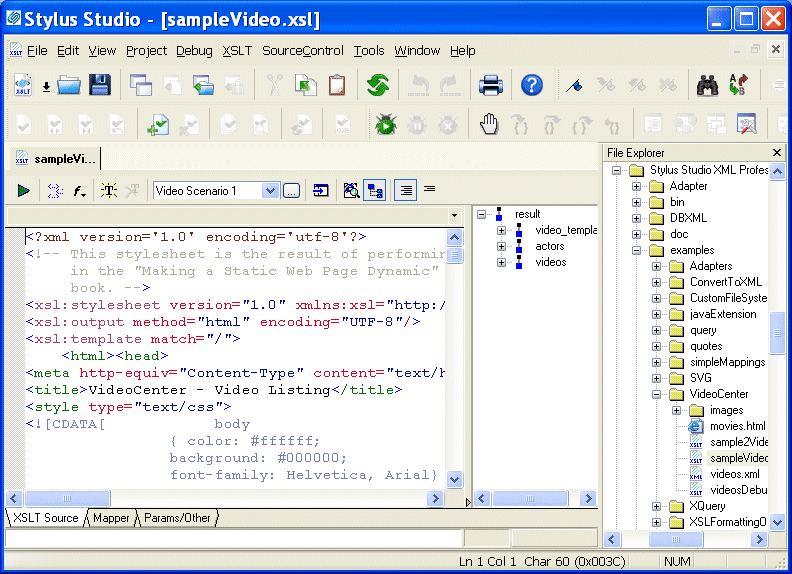
About the XSLT Editor

The XSLT editor, which displays a stylesheet when you open it, has four tabs at the bottom.

Figure 202. XSLT Editor

The XSLT Source, Mapper, and Params/Other tabs are always available.

Editing XSLT as XML

If you want, you can edit an XSLT file as an XML file. To do this, open the stylesheet in the XML editor instead of in the XSLT editor. In the Open dialog box, click the down arrow in the Open button. Click XML Editor in the drop-down menu. A document can be open in the XML editor and in the XSLT editor at the same time.

EDI to XML Mapping

A tutorial on how to transform EDI files into XML using Stylus Studio's Convert to XML tool. Subsequent post-processing of the converted EDI data is done through XQuery or XSLT, modeling a real world XML data integration application.

Government Agencies That Use Stylus Studio

Government agencies all around the nation are pledging their allegiance to Stylus Studio. Come see which government agencies are using the only XML IDE by the people and for the people.

Learn XQuery

Stylus Studio offers three infomative XQuery demonstration videos illustrating Stylus Studio's XQuery Editor, Mapper, Debugger and other advanced functionality. Watch them today!

Translating X12 Documents to XML

The X12 to XML Converter is a built-in function of the adapter library. The XML that is generated is well commented and indented, and can be used anywhere XML is normally used — with XML Schemas, XSLT, XQuery, etc.

Stylus Most Wanted

Site Map | Privacy Policy | Terms of Use | Trademarks
Free Stylus Studio XML Training:
W3C Member
Stylus Studio® and DataDirect XQuery™are products from DataDirect Technologies, is a registered trademark of Progress Software Corporation, in the U.S. and other countries. © 2004-2007 All Rights Reserved.