Creating a Template That Matches the author Element

This topic is part of a sequence that starts with Creating a New Sample Stylesheet.

To define a template that matches the author element:
1. In the XSLT editor source document tree pane, expand the book element.
2. Double-click the author element.

Stylus Studio creates a template that matches the author element, and places it near the end of the stylesheet.

3. In the XSLT editor pane view, edit the template body so that it contains only the following contents.
<xsl:value-of select="first-name"/>
               
&nbsp;
               
<xsl:value-of select="last-name"/>


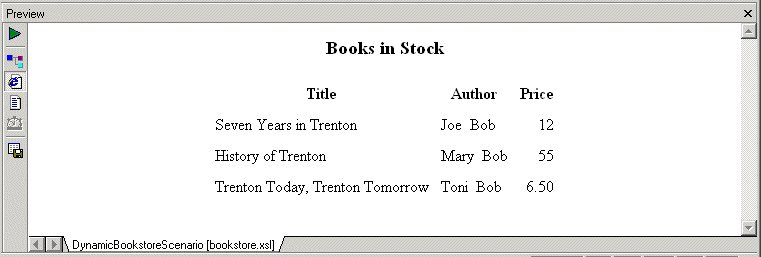
If you do not include the nonbreaking space entity, the first name and the last name have no space between them. Press F5 to see the results of this change, as shown in Figure 201.

Figure 201. Result of XSLT with an Author Template

4. Save the stylesheet by clicking Save .
5. Close the stylesheet by clicking File > Close on the Stylus Studio menu bar.

Building Web Services With Stylus Studio

This video demonstration shows you how to use Stylus Studio's Web Service call composer to locate a WSDL file on the Internet, inspect, create SOAP envelope, invoke and inspect Web service data.

Improving XSLT and XQuery Performance with Stylus Studio

This online video demonstration covers XQuery and XSLT performance tuning using the Stylus Studio XSLT profiler and the XQuery profiler.

SQL/XML Tutorial

Many developers need to be able to write applications that work for databases from multiple vendors. This SQL/XML Tutorial refers to SQL/XML, XQuery, and Native XML Programming Languages to do just that.

Java Code Generation

The Stylus Studio Java Codce Generator lets you generate deployable Java code for XQuery and XSLT at the push of a button!

Stylus Most Wanted

Site Map | Privacy Policy | Terms of Use | Trademarks
Free Stylus Studio XML Training:
W3C Member
Stylus Studio® and DataDirect XQuery™are products from DataDirect Technologies, is a registered trademark of Progress Software Corporation, in the U.S. and other countries. © 2004-2007 All Rights Reserved.