Home >
Online Product Documentation >
Table of Contents >
Example
Example
In this example, we have imported the WSDL
my_StockQuotes.wsdl into our local WSDL. This WSDL is a copy of the Swanand Mokashi
StockQuotes.wsdl. When imported, Stylus Studio creates the following:
|
<?xml version="1.0"?>
<wsdl:definitions xmlns:xsd="http://www.w3.org/2001/XMLSchema"
xmlns:wsdl="http://schemas.xmlsoap.org/wsdl/"
xmlns:auto9="http://swanandmokashi.com">
<wsdl:import namespace="http://swanandmokashi.com"
location="file:///w:/testing/my_StockQuotes.wsdl"/>
|
In addition to the default
xmlns:xsd and
xmlns:wsdl namespaces created with the Definitions elements, notice that the
xmlns:auto9 namespace has been added.
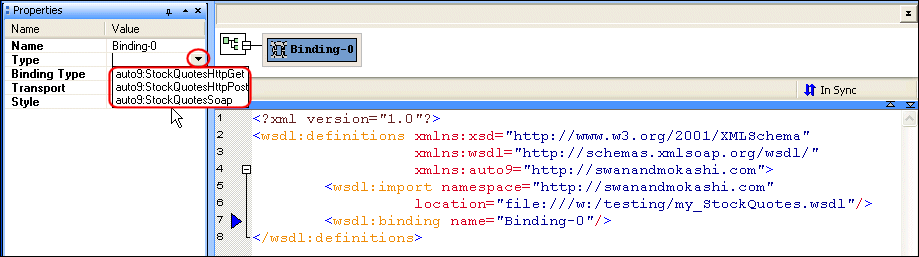
Now, if we load the imported WSDL and then create a Binding element, we see that the
Type property drop-down list contains several types with the
auto9 namespace prefix:
|
|
Figure 385. Elements Defined in an Imported WSDL
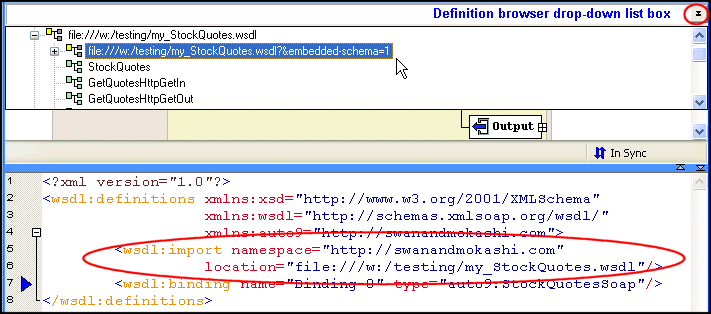
In addition, the imported WSDL now appears in the definitions browser.
|
|
Figure 386. Definition Browser Shows Imported WSDL
 Cart
Cart