Verifying the Current Java Virtual Machine

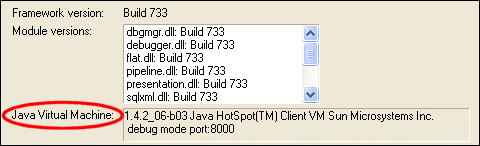
The Java Virtual Machine (JVM) interprets runtime commands and compiler instructions; it is part of the Java installation. You can check to see the current version of the JVM installation by selecting Help > About from the Stylus Studio menu:

Figure 101. Verifying the Current JVM Installation

The Java Virtual Machine field displays information about the JVM installed on your machine.

XML Editor

Stylus Studio XML editor includes many XML editing utilities and features to simplify XML development, including intuitive XML editing views, integrated XML validation and troubleshooting utilities, XML formatting tools, XML generation tools, etc.

Hotels, Casinos & Resorts That Use Stylus Studio

What's more romantic than a vacation for two and the world's best XML IDE at your finger tips? Nothing, that's why these hotels, casinos, & resorts are using Stylus Studio to help you get on your dream vacation.

Computing XML Differences in Stylus Studio

See for yourself just how easy it is to visually compare different XML files or folders using Stylus Studio's powerful new XML Differencing Utility. Quickly and easily analyze and merge changes made to different XML documents!

SQL Server Tools

SQL Server Tools in Stylus Studio simplify working with relational and XML data including exporting data from a SQL Server database into XML and importing XML data back into SQL Server. Supports Microsoft SQL Server 2000 and Microsoft SQL Server 2005

Stylus Most Wanted

 
Free Stylus Studio XML Training:
W3C Member