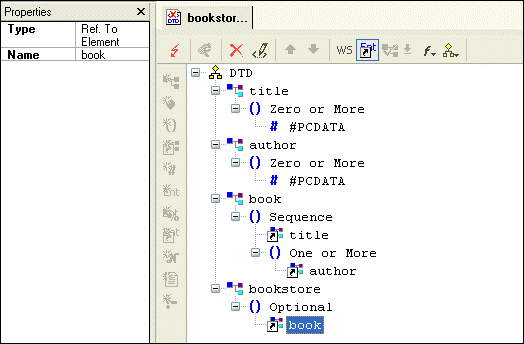
Examining the Tree of a Sample DTD

This topic is part of a sequence that starts with Creating a Sample DTD.

Your DTD should now look like Figure 51.

i

Figure 51. Finished bookstore.dtd

To complete this DTD, you could define magazine and newsletter elements. In the bookstore element definition, you could add references to the magazine and newsletter elements. You could also expand the definition of the book element to include information about the publisher, price, publication date, and number of pages.

SQL Server Tools

SQL Server Tools in Stylus Studio simplify working with relational and XML data including exporting data from a SQL Server database into XML and importing XML data back into SQL Server. Supports Microsoft SQL Server 2000 and Microsoft SQL Server 2005

XSLT Mapper

Simplify XSLT mapping with the Stylus Studio XSLT Mapper - supports multiple data sources, round-trip engineering (synchronized editing views), XSLT function blocks, integrated XSLT preview and more.

Translating X12 Documents to XML

The X12 to XML Converter is a built-in function of the adapter library. The XML that is generated is well commented and indented, and can be used anywhere XML is normally used — with XML Schemas, XSLT, XQuery, etc.

Xerces - Parsing and Validating XML with the Apache Xerces Parser

The Xerces Parser supports the XML 1.0 recommendation and W3C's XML Schema recommendation version 1.0, DOM and SAX. Learn how easy it is to use Apache Xerces directly in Stylus Studio to parse and validate XML with ease.

Stylus Most Wanted

Site Map | Privacy Policy | Terms of Use | Trademarks
Free Stylus Studio XML Training:
W3C Member
Stylus Studio® and DataDirect XQuery™are products from DataDirect Technologies, is a registered trademark of Progress Software Corporation, in the U.S. and other countries. © 2004-2007 All Rights Reserved.