Cart
Cart
|
Home > Online Product Documentation > Table of Contents > Ending Processing During a Debug Session Ending Processing During a Debug SessionTo end processing during a debug session:
1. In the
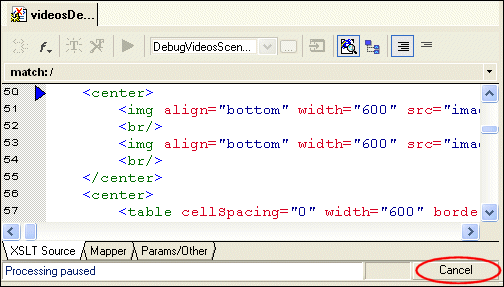
Preview window, click any line of text.
In the XSLT Source tab, Stylus Studio displays the blue back-mapping triangle that indicates the line in the stylesheet that generated the output line you clicked.
2. In the lower right corner of the XSLT editor, click the
Cancel button to end processing.
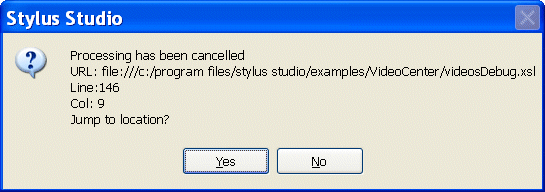
Stylus Studio displays a notification message that indicates that processing has been stopped and, optionally, allows you to jump to the location where processing ended.
3. Click
Yes to jump to the location where processing ended.
The cursor appears on line 146 of the XSLT Source tab, which contains
<xsl:apply-templates select="director"/>.
4. In the XSLT editor tool bar, click
Open XML from Scenario
 .
.
Stylus Studio displays the XML source document that the stylesheet operates on. As you can see, the first
This section demonstrated some of the major features of Stylus Studio's debug tools, including specialized windows for presenting call stack and variable information. For complete information on using the XSLT debugger, see Chapter 6Debugging Stylesheets. |

XML PRODUCTIVITY THROUGH INNOVATION ™