Home >
Online Product Documentation >
Table of Contents >
Opening a Sample XML Document
Opening a Sample XML Document
To open the your-quotes.xml sample XML document in Stylus Studio:
1. In the
File Explorer window, navigate to the
examples\quotes directory in your Stylus Studio installation directory.
|
Tip
|
|
The
\examples directory is a sibling of
\bin.
|
2. Double-click
your-quotes.xml.
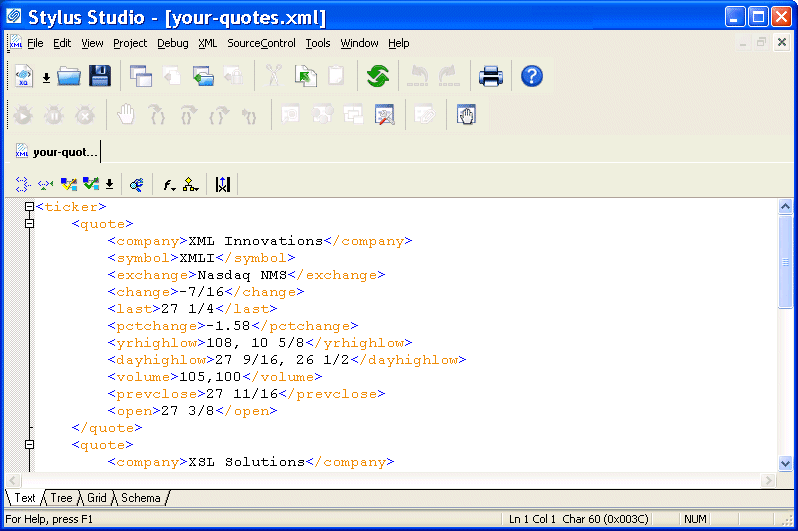
Stylus Studio displays the
your-quotes.xml document in the XML editor. The initial view of the document is the
Text view, as you can see by the tab at the bottom of the window.
|
|
Figure 4. Editors Use Color-Keyed Text
|
Tip
|
|
Stylus Studio uses different colors to distinguish markup, tag names, and data in all of its text editors. Orange, for example, identifies elements that are not associated with a schema. You can change the colors for editors individually. Select
Tools > Options from the menu bar, then select
Editor Format. You select the editor whose settings you want to modify using the
Editor drop-down list.
|
Alternatives
The
File Explorer window is the primary way to open and access files in Stylus Studio, but you can also open files using:
- The
Open dialog box, which is displayed when you select
File >
Open from the menu bar or click the
Open
 button on the tool bar, for example.
- The
Project window, which is displayed on the left of the Stylus Studio desktop. The
Project window shows only those files associated with Stylus Studio projects.
For more information
See
Opening Files in Stylus Studio to learn more about the
File Explorer window.
See
Working with Projects to learn more about projects in Stylus Studio.
 Cart
Cart