Setting and Removing Breakpoints

You can set breakpoints on any node in an XML pipeline. You cannot set breakpoints on a node's input and output ports.

To set a breakpoint:
1. Select the XML pipeline node on which you wish to set the breakpoint.
2. Click the Toggle Breakpoint button ( ) or press F9.

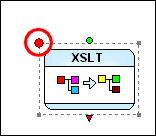
Stylus Studio displays a breakpoint symbol (a large red circle) next to the node.

Figure 427. Breakpoint Set on a Node

To remove a breakpoint:
1. Select the XML pipeline node whose breakpoint you wish to remove.
2. Click the Toggle Breakpoint button ( ) or press F9.

Converting Custom EDI Message Types to XML

Vital and valuable legacy data locked in proprietary EDI files? See how to use DataDirect XML Converters™ custom EDI message type tools to convert nonconformant EDI to XML.

XML Well-Formedness Checker & XML Indenter

Tidy up your XML documents with powerful integrated XML editing utilities including a single-click XML formatter, pretty printer, XML indenter and XML well formedness checker.

Electronics & Electrical Equipment

Many electronics and electrical equipment companies need the most powerful XML IDE to power up their companies. Come see which electronics & electrical equipment companies are wired up with Stylus Studio 2006.

XSLT Debugger

Stylus Studio's XSLT debugger - a requirement for building bug-free XSLT stylesheets and XML data transformation applications. Stylus Studio's XSLT debugger gives you complete visibility and control over the XSLT transformation process.

Stylus Most Wanted

Site Map | Privacy Policy | Terms of Use | Trademarks
Free Stylus Studio XML Training:
W3C Member
Stylus Studio® and DataDirect XQuery™are products from DataDirect Technologies, is a registered trademark of Progress Software Corporation, in the U.S. and other countries. © 2004-2007 All Rights Reserved.