Where Converter URLs are Displayed in Stylus Studio

Converter URLs are displayed in the following places in Stylus Studio:

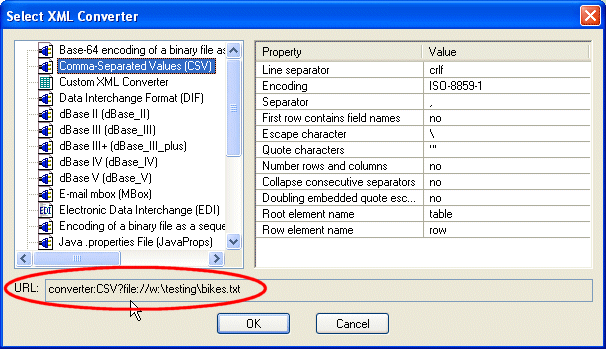
  • The URL field of the Select XML Converter dialog box displays the converter URL for the XML Converters or custom XML conversion definition you have selected.

Figure 188. Converter URL Displayed in the Select XML Converter Dialog Box

Note that XML Converters name and properties used in the converter URL vary from the full names displayed in the Select XML Converter dialog box. In addition, note that only properties whose default value you change in the Value field are displayed in the URL field.

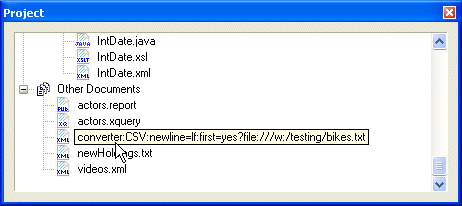
  • The Project window (select Show Full URL from the Project window shortcut menu) displays the converter URL used to create an XML document:

Figure 189. Converter URL Displayed in Project WIndow

You can use either source for the converter URL strings you want to use in your XQuery and XSLT code. See Using Stylus Studio to Build a Converter URL for more information.

Tip


Converter URLs in the Select XML Converter dialog box are already escaped and can be used as-is. Converter URLs taken from the Project window must be escaped manually when you paste them into your XSLT or XQuery code.

XML File Explorer

The XML File Explorer provides a productive, consistent, and easy-to-use interface for working with any data sources (relational data, EDI, binary, XML, CSV, and more) used in enterprise data integration projects.

XML Videos

Stylus Studio online XML video demonstrations illustrate how easy it is to learn advanced XML editing techniques. Now playing: Java Code Generation, Convert to XML, Grid View, and many other informative video demonstrations.

Manufacturing

Manufacturing

Electronic Data Interchange (EDI) Blog

The EDI-L Blog is the best technical forum for discussing topics related to Electronic Data Interchange (EDI), including EDIFACT, and X12 Technologies. Topics include EDI Software, EDI Standards, EDI applications, EDI examples, and more.

Stylus Most Wanted

 
Free Stylus Studio XML Training:
W3C Member