Custom XML Converters

In Stylus Studio, you create a custom XML Converters by creating a custom XML conversion definition that allows the DataDirect XML Converters engine to convert proprietary files and extensions to standard formats.

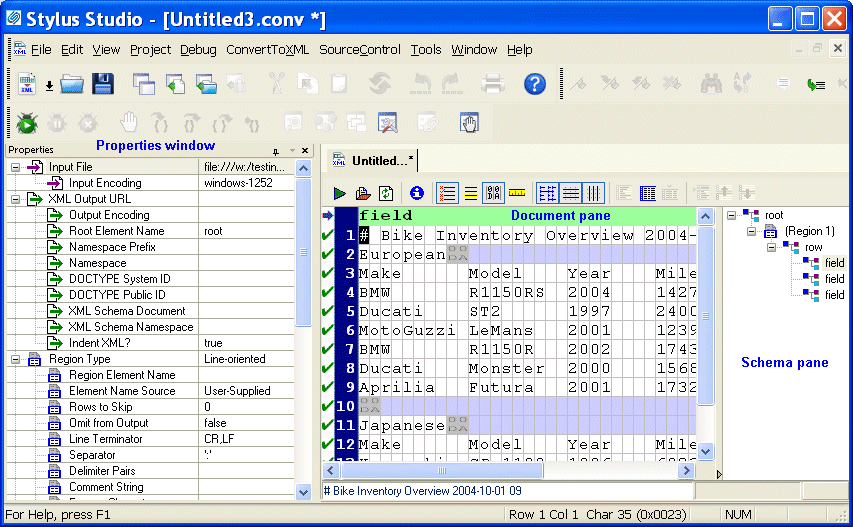
You create a custom XML conversion definition by selecting an input file and then using the Custom XML Conversion Definition Editor, shown in Figure 148, to specify the properties you want to use to convert that file (or others that share the same format).

Figure 148. Custom XML Conversion Definition Editor

The Custom XML Conversion Definition Editor displays information read from the input file, as well a number of other properties you can specify (such as whether or not you want element names based on the file's first row, for example) that are used when the file is converted from one format to another.

Multi Channel Publishing

Multi channel publishing lets you go beyond single-source publishing of HTML and PDF to also generate simultaneously for non-document forms, such as to communicate with partners or drive spreadsheets.

XSLT Profiler

Stylus Studio's XSL and XSLT profiler allows you to create detailed XSLT performance metrics profiles of any stylesheet in a processor-independent way.

Stylus Studio Lends a Helping Hand to the New Orleans Reconstruction Efforts

Read how Stylus Studio is helping with the on-going hurricane Katrina reconstruction efforts in New Orleans.

Simple API for XML (SAX)

SAX stands for Simple API for XML - SAX is an XML standard used everywhere in Stylus Studio, for parsing and building representations of XML documents.

Stylus Most Wanted

Site Map | Privacy Policy | Terms of Use | Trademarks
Free Stylus Studio XML Training:
W3C Member
Stylus Studio® and DataDirect XQuery™are products from DataDirect Technologies, is a registered trademark of Progress Software Corporation, in the U.S. and other countries. © 2004-2007 All Rights Reserved.