Cart
Cart
|
Home > Online Product Documentation > Table of Contents > How to Open a File Using a Custom XML Conversion Definition How to Open a File Using a Custom XML Conversion DefinitionYou can use the Open dialog box to open a file using a custom XML conversion definition in Stylus Studio. To open a file using a custom XML conversion definition from the Open dialog box:
1. Display the
Open dialog box (select
File > Open from the Stylus Studio menu, for example).
2. Navigate to the directory that contains the file you want to open using the custom XML conversion definition and select the file.
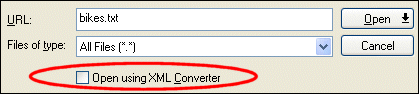
3. Check the
Open using XML Converter check box and click the
Open button.
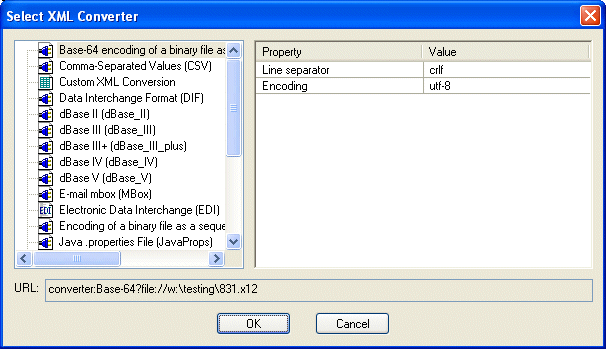
Stylus Studio displays the Select XML Converter dialog box.
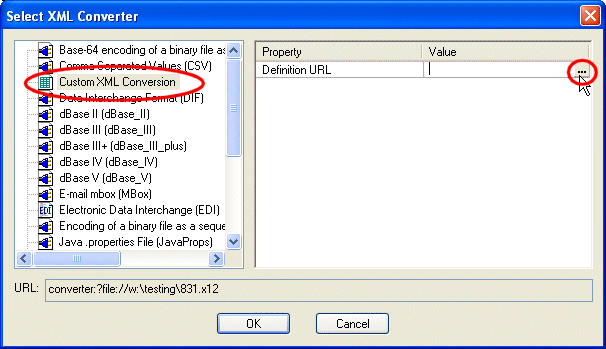
4. If you are using a custom XML conversion definition (
.conv), select
Custom XML Conversions. Then, use the browse button in the
Value field to locate the custom XML conversion definition you want to use. Go to
step 5.
5. Click
OK.
The file is converted to XML and appears in the editor from which you displayed the Open dialog box in step 1.
|

XML PRODUCTIVITY THROUGH INNOVATION ™