Cart
Cart|
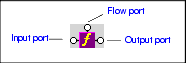
Home > Online Product Documentation > Table of Contents > XPath Function Blocks XPath Function BlocksStylus Studio supports standard XPath functions defined by the W3C. This section describes how to work with function blocks in XSLT mapper and covers the following topics: Parts of a Function BlockFunction blocks are drawn as a purple block with an italic " f" at its center, and connectors, called ports, placed along the block's border. Input ports (one or more depending on the function) on the left, the flow port at the top, and the output port on the right:
Input portsInput ports are on the left side of the function block. The number and definition of input ports varies from function to function. To specify a value for an input port, you can Flow portFlow ports on the top of function blocks are generally used only when a function is used in a direct link between a source and target node. Output portThe output port is on the right side of the function block. You use the output port to map the function result directly to a target structure element or attribute, or to an IF, condition, or another function block. Types of Function BlocksThe XPath functions available in XSLT mapper include the following: XPath Mathematical FunctionsIn order to simplify the graphical presentation in the XSLT mapper, the following XPath mathematical functions are not graphically represented: You can easily express these functions by typing them in the Value dialog box displayed when you double-click an input port. Creating a Function BlockTo create a function block:
1. In the XSLT editor, in the
Mapper tab, right-click mapper canvas.
2. In the shortcut menu that appears, click
XPath Functions and slide to the submenu.
3. Click the function you want to use. Stylus Studio displays a function block for the function you selected.
Deleting a Function BlockTo delete a function block:Select it and press the Delete key. If the function block is part of a link, deleting the function block also deletes the link. |

XML PRODUCTIVITY THROUGH INNOVATION ™